DSH plugin: sec_e_no_credentials schannel TLS error
sec_e_no_credentials (full form schannel: AcquireCredentialsHandle failed: SEC_E_NO_CREDENTIALS) is often read as "missing API credential", but inside the DeepSeek Harness runtime it is really the Windows native TLS backend (schannel) failing to reach the system certificate/credential store, so every HTTPS request fails. Error X → do W: switch the offending command to the OpenSSL backend, for example git -c http.sslBackend=openssl ..., or bypass Git entirely with the npm channel, rather than swapping your API key (source).
The name carrying credentials is misleading — this credentials means the Windows security package's credential handle, not the model service's API credential. A user hit this in the wild: in a sandbox curl https://github.com returned 000 and git push printed this sentence; the network itself was not blocked, a plaintext request worked, and the TCP connection to github.com:443 went through — only the Windows native TLS credential store was unreachable (source). Below: what it means, how to fix it, and how to verify.
What the sec_e_no_credentials error means: schannel is missing, not your API key
SEC_E_NO_CREDENTIALS is the error code the Windows schannel security package throws when it cannot obtain a usable credential handle; it happens at the TLS handshake stage and has nothing to do with the model API credential — in a sandbox that isolates the system credential store, the schannel handshake fails with this error (source). Compare the cases:
| Symptom | Real cause | Handling |
|---|---|---|
curl https://github.com returns 000 | schannel cannot get a credential | switch to the OpenSSL backend |
schannel: AcquireCredentialsHandle failed: SEC_E_NO_CREDENTIALS | same as above | same as above |
Failed to connect but TCP is fine | a TLS-backend problem, not the network | switch the TLS backend |
Read it in this order:
- It is a local TLS-backend problem — schannel needs to read the system certificate and credential store; a sandbox isolates that store, so the handshake fails. Expected: the same command with the OpenSSL backend succeeds.
- It is not the network being blocked — the TCP connection to the target port usually still establishes, and an
http://plaintext request also works. Expected: connecting but failing HTTPS is the signature of a TLS backend. - It is a different thing from the model API credential — the code that means a missing API key in DeepSeek Harness is
MISSING_CREDENTIAL(source). Expected: a different error string means a completely different direction.
Keep one sentence: the credentials in this name belong to the Windows security package, not to your API key.
A quick discriminator between the two "credential" errors: one is about the handshake, the other about the request. sec_e_no_credentials fails before any HTTP request is sent — the TLS handshake cannot even start — so nothing reaches the provider and no authentication is attempted. MISSING_CREDENTIAL fails after the request is built, when DeepSeek Harness looks for an API key to attach and finds none. If you see the schannel text, swapping keys changes nothing, because no key was ever consulted.
How to fix sec_e_no_credentials: switch to the OpenSSL backend and bypass with npm
There are two fixes: temporarily switch the offending command to the OpenSSL backend, or just use the npm channel that does not go through Git; both bypass schannel and neither touches your API credentials. Run the steps in order:
- Switch the TLS backend for a single command — Git for Windows ships OpenSSL and a CA bundle, so add the parameter to that command:
Expected: the command completes the TLS handshake and pushes normally (source).powershell
git -c http.sslBackend=openssl push -u origin main - Do not write it into the global git config — using
-caffects only this invocation, which is safer; writing it globally changes TLS behaviour for every repository. Expected: schannel works fine in an ordinary terminal, with no global change needed. - Install the plugin through the npm channel — a plugin supports both a
github:direct install and an npm package-name install; when the schannel error hits, prefer the npm-name route and bypass Git:Expected: the install no longer triggers the TLS-backend error (source).bashdsh plugin --profile web add <npm package name> - Retry in an ordinary terminal — leave the sandbox and run the same operation in a plain terminal. Expected: schannel can reach the credential store normally, usually needing no extra parameters (source).
- Record and reuse the fix — make "this environment goes OpenSSL backend / goes npm" a habit, to step around the same pitfall in later commands. Expected: similar HTTPS operations no longer throw this sentence.
Why the parameter is scoped to one command: the OpenSSL backend exists for cases like this, but switching it globally changes how every repository negotiates TLS, including ones behind a corporate proxy that expects schannel; keeping it on the single command that runs inside the sandbox leaves the rest of the machine on the default backend. The npm route is even narrower — a plugin install never invokes Git, so no TLS-backend choice is involved at all.
One plugin-related note: if you hit this sentence while installing a plugin, the npm channel is the least trouble; once it is installed, cross-check its source and version in the DSH Plugin Hub installed list.
How to verify it and the common misconfiguration: do not treat it as a missing API key
Verification has two layers: first confirm the relationship between the network and TLS (TCP works, HTTPS fails because of the backend), then retest with the backend-switched command; the most common misconfiguration is treating it as a missing API key and swapping keys over and over — which fixes nothing (source). Run the steps in order:
- Confirm the network is not blocked — test whether a TCP connection to
github.com:443establishes and whether anhttp://plaintext request works. Expected: TCP works and plaintext works, meaning the problem is only the TLS backend. - Tell "cannot connect" from "repository does not exist" —
Failed to connectorSEC_E_NO_CREDENTIALSis a TLS-backend problem, whileremote: Repository not found.means TLS is already through and only the repo is not created. Expected: locate it by the error string, without misjudging. - Retest with the backend-switched command — rerun the command with
-c http.sslBackend=openssl. Expected: success proves it was schannel's fault and unrelated to credentials. - Compare with the real credential error codes — if you suspect a model-credential problem, look for
MISSING_CREDENTIAL/UNKNOWN_MODEL, covered in DeepSeek Harness API key errors: MISSING_CREDENTIAL and UNKNOWN_MODEL; for a 401, see DeepSeek Harness "available models" 401. Expected: you can tell "TLS-backend error" apart from "model-credential error" and stop crossing wires. - Common misconfiguration checklist:
- treating it as a missing API key and regenerating / replacing keys over and over — ineffective;
- writing
http.sslBackend=opensslinto the global config — too broad an impact, and unnecessary; - assuming it is a repository-permission problem — a failed authentication reports
authentication failed, not this sentence.
The misjudgment that wastes the most time is blaming the repository. A private repository you genuinely lack access to reports authentication failed or Repository not found, both after a successful handshake; this error reports the handshake itself. If curl to the same host returns 000, the repository question is moot until the TLS backend is fixed.
Troubleshooting notes for a DSH plugin on Windows
- Read the string before acting —
sec_e_no_credentialsis a TLS-backend error, not a credential error. - Change the backend for a single command only —
-c http.sslBackend=opensslis use-and-discard, so do not globalize it. - Prefer the npm channel — when installing a plugin, go npm instead of Git and bypass schannel.
- An ordinary terminal usually needs no change — in a non-sandbox environment, schannel is generally usable.
- Compare with the real credential code —
MISSING_CREDENTIALis the signal for a missing API key.
The official DSH plugin TLS mechanism under the Windows sandbox
At the official-mechanism level, two points are enough: the sandbox isolates the Windows TLS credential store; and a plugin's network requests therefore often run explicitly in an unrestricted mode to avoid being held up by the ACL sandbox. Two points:
- What is isolated is the credential store, not the network — under the sandbox schannel cannot get a credential, but TCP and plaintext requests work (source). Expected: rule out "the network is blocked" first when judging the problem.
- Plugins adjust their run mode to step around the restriction — some plugins make requests run explicitly in an unrestricted way on Windows, because a sandboxed PowerShell cannot complete a schannel handshake (source). Expected: with this layer understood, the same class of error reads as an environment limit rather than a plugin defect.
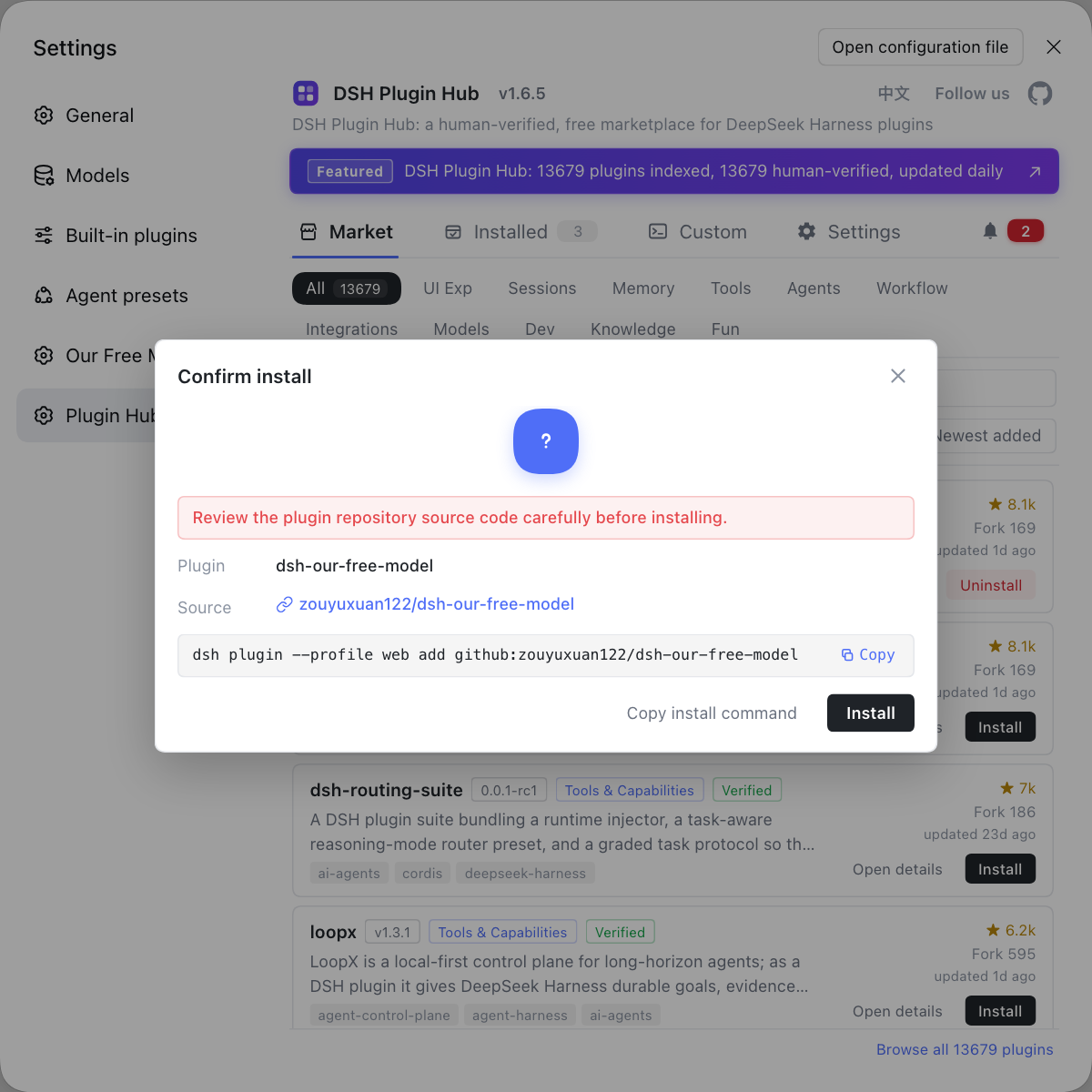
Rather than treating this environment error as a credential problem and swapping keys over and over, use the DSH Plugin Hub install confirmation dialog to add the plugins you need — seeing what command it runs before install saves more trouble than debugging afterwards. Its home page is https://dsh-plugin.org/.
Sources: deepseek-ai/deepseek-harness (official repo), DeepSeek API official docs, community plugin dsh-computer-use-mode.
FAQ
Inside the DeepSeek Harness runtime this is the Windows native TLS (schannel) backend failing to reach the system certificate/credential store in a sandbox, so HTTPS requests cannot start — it is not a missing API credential. The symptom is curl returning 000 and git push printing this sentence; switching to the OpenSSL backend works around it.
In DeepSeek Harness the code that means a missing API key is MISSING_CREDENTIAL, not sec_e_no_credentials, which is a Windows schannel TLS error meaning the security package could not get a credential handle. One is a model-credential problem and the other a local TLS-backend problem, so do not conflate them.
To work around sec_e_no_credentials in a DeepSeek Harness sandbox, add the parameter to the one git command that throws: git -c http.sslBackend=openssl push -u origin main. Git for Windows ships OpenSSL and a CA bundle, so bypassing schannel completes the handshake; do not write this parameter into the global git config.
When a plugin install in a sandbox hits sec_e_no_credentials through git, the easier route in DeepSeek Harness is to install through the npm channel instead, without going through Git. A DeepSeek Harness plugin supports both a github: direct install and an npm package-name install, so when the schannel error hits, prefer the npm-name route; running the install in an ordinary (non-sandbox) terminal usually needs no extra parameters either.
To verify sec_e_no_credentials is fixed in a DeepSeek Harness environment, do it in two steps: first confirm the network itself is not blocked — a TCP connection to github.com:443 should establish and an http:// plaintext request should work. Then retry the HTTPS command with the OpenSSL backend, and a successful handshake proves it was only a TLS-backend issue, not the network or a missing repository.
Related Terms
- SEC_E_NO_CREDENTIALS
- SEC_E_NO_CREDENTIALS is an error code from the Windows schannel security package meaning no usable credential handle could be obtained; in a sandbox it shows up as an HTTPS request failing its TLS handshake, not as a missing API credential.— Community plugin dsh-computer-use-mode
- schannel
- schannel is the Windows native TLS/SSL backend, relying on the system certificate and credential store; when the runtime environment isolates that store, the schannel handshake fails with SEC_E_NO_CREDENTIALS.— Community plugin dsh-computer-use-mode
- OpenSSL backend
- The OpenSSL backend is the alternative TLS backend Git can switch to, shipping its own CA bundle and not relying on the Windows credential store; enable it per command with git -c http.sslBackend=openssl.— Community plugin dsh-computer-use-mode
- MISSING_CREDENTIAL
- MISSING_CREDENTIAL is the error code DeepSeek Harness throws when it finds no API key at request time, meaning the model credential was not stored or the environment variable was not exported.— DeepSeek Harness official docs - providers
Sources
- deepseek-ai/deepseek-harness (official repo: sandbox and runtime)· deepseek-ai
- DeepSeek API official docs (authentication: Bearer Token)· DeepSeek
- DeepSeek Harness official docs providers - configure model providers· deepseek-ai
- Community plugin dsh-computer-use-mode (records the schannel: AcquireCredentialsHandle failed: SEC_E_NO_CREDENTIALS text and handling)· community