Fix request extension preparation failed: DSH plugin
The full form of this error is "this turn failed / DeepSeek request extension preparation failed," with the error code REQUEST_EXTENSION — error X → do W: work through three steps — restart the session → reinstall the affected plugin → read the logs to locate the extension — to find the extension source that is dragging the whole turn down (source). Because it happens before the adapter's fetch, its hallmark is zero network traffic, which lets you rule out network, proxy, auth and quota in one pass. This is a "stop the bleeding first, then triage" guide; for the deep dive into the "broken plugin package" root-cause chain, see request extension failure: one broken package drags down the official route.
What the "deepseek request extension preparation failed" error means
It means one DeepSeek Harness request failed at the "extension preparation" stage: before it ever sends HTTP, the adapter runs all request-extension contributors concurrently, and if any one of them throws, the whole turn is judged failed and wrapped as REQUEST_EXTENSION (source). Three key facts:
- It fails before
fetch— the request is never sent, so "zero network traffic" is its most recognizable fingerprint. - It is a "request extension" problem — the culprits are usually contributors that attach information to the request before sending it, for example collecting diagnostic fields about the active plugin packages.
- It drags down the whole batch — preparation runs on
Promise.all, so one contributor rejecting rejects everything, and every turn fails.
See how it splits from its neighbour first so you do not conflate them:
| Error | Code | Failure point | Network traffic |
|---|---|---|---|
| request extension preparation failed | REQUEST_EXTENSION | before fetch (local preparation) | zero |
| messages transport failed | TRANSPORT | connection or streaming stage | depends |
A second useful conclusion: because preparation runs before any socket is opened, the error can never be caused by a timeout, a rejected API key or an exhausted quota — all of those are business errors that would surface with their own codes much later in the pipeline. If you catch yourself checking proxy settings or firewall rules after seeing this line, stop: the request never left the machine, so the answer is always somewhere in the local plugin metadata.
Remember one line: when you see REQUEST_EXTENSION, do not suspect the network first — suspect "some request extension threw during local preparation."
Fix DeepSeek Harness request extension failures: restart, reinstall, read logs
The fix has two layers: first "stop the bleeding" — get the current turn running again; then locate "the wound" — find the extension source that dragged the request down. Four steps:
- Restart the session and confirm whether the symptom persists — close the current session, start a new one, resend the message. Expected: if it flashed once and recovered, it was probably intermittent; if every turn reports the same line, it is deterministic, so keep going.
- Confirm whether only the official route is affected — send once through a different route on the same profile. Expected: other routes work and only the official route fails every turn, which narrows it to the request-extension contributor unique to the official route.
- Reinstall the affected plugin — in the plugin panel, uninstall and reinstall any recently added or updated plugin, or temporarily remove it. Expected: when a package directory was hollowed out by an updater, or a manifest is missing a field, reinstalling restores it and the error goes away.
- Read the logs and expand
causeto pin the specific extension — open that turn's record in the session log and expand the error object'scause. Expected:causenames the package or manifest path; that layer is the truly actionable clue.
After you expand cause, two shapes are common:
- It points at an active plugin package that cannot resolve — the message contains something like "cannot resolve active package," which means a package has no readable
package.jsonon disk. - It points at a manifest that "has a name but no version" — the
package.jsonfound by walking up declaresnamebut noversion, which falls outside the validation's tolerance.
One easily missed detail: after the fix you usually do not need to restart the host. Failed resolution results are not cached, so once you restore the missing field or the broken package directory, the next request recovers — which also means "restarting" is not the fix itself, only a way to try again.
That last point deserves emphasis because it is where most people waste time. Restarting the host or the session feels like progress, but it changes nothing about the resolver's input: the same broken package directory or the same manifest missing version is read again on the next turn, so the error simply reappears. Spend those minutes on step 4 instead — expand cause, name the offending package or manifest, and repair it. The recovery is immediate and needs no ceremony once the underlying metadata is correct.
Separating it from the broken-package branch
Behind the same REQUEST_EXTENSION error there are at least two trigger paths — "a plugin package itself is broken" and "the generated manifest is missing a field from the start" — and the test is whether cause points at a package directory or a manifest; both paths are written up cause by cause in the dedicated broken-package guide, while this page just finishes the "stop the bleeding, then triage" layer.
One more in the same family to keep separate: TRANSPORT is the transport layer's fallback label, meaning the failure could not be classified, which is a different thing from "the request was blocked by an extension during preparation" — for the distinguishing points and check order, see DeepSeek Harness messages transport failed.
Before troubleshooting a DSH plugin request extension error
Record your change points before you install, uninstall or update any DSH plugin, and the next REQUEST_EXTENSION will be much faster to pin down. Three notes:
- Learn the fingerprint before you touch anything —
REQUEST_EXTENSIONequals "zero network traffic + a local preparation failure," so use that to rule out the entire network layer first. - Keep changes traceable — manage plugin additions, removals and version updates in one place, and when troubleshooting ask "what changed recently" first; the installed list and system logs in DSH Plugin Hub let you cross-check.
- The message swallows clues — the current UI renders only the outermost line, so the real
causeneeds to be expanded by you; do not just stare at thatpreparation failedline.
Notes and limits when using DSH plugin
- One bad extension can drag down a whole turn — preparation uses
Promise.allwith no per-package fault tolerance, so "only one package is broken" is enough to take the entire official route down. - The upside is that fixing it restores it — failed resolutions are not cached, so once you add the missing field or restore the package directory the next request is fine, with no host restart.
- Do not treat relative-path entries as immune — relative, absolute and file-URL entries silently omit only when no manifest is found; once the manifest found by walking up exists but is malformed, it throws just the same.
- The error not naming the package is the current gap — this step often means adding a temporary print or reading the host logs yourself to get
cause. - Whether the official team has fixed it is version-dependent — this chain is a strict contract spelled out in the docs, so take your installed official version's notes as authoritative and do not assume "the next version will just fix it."
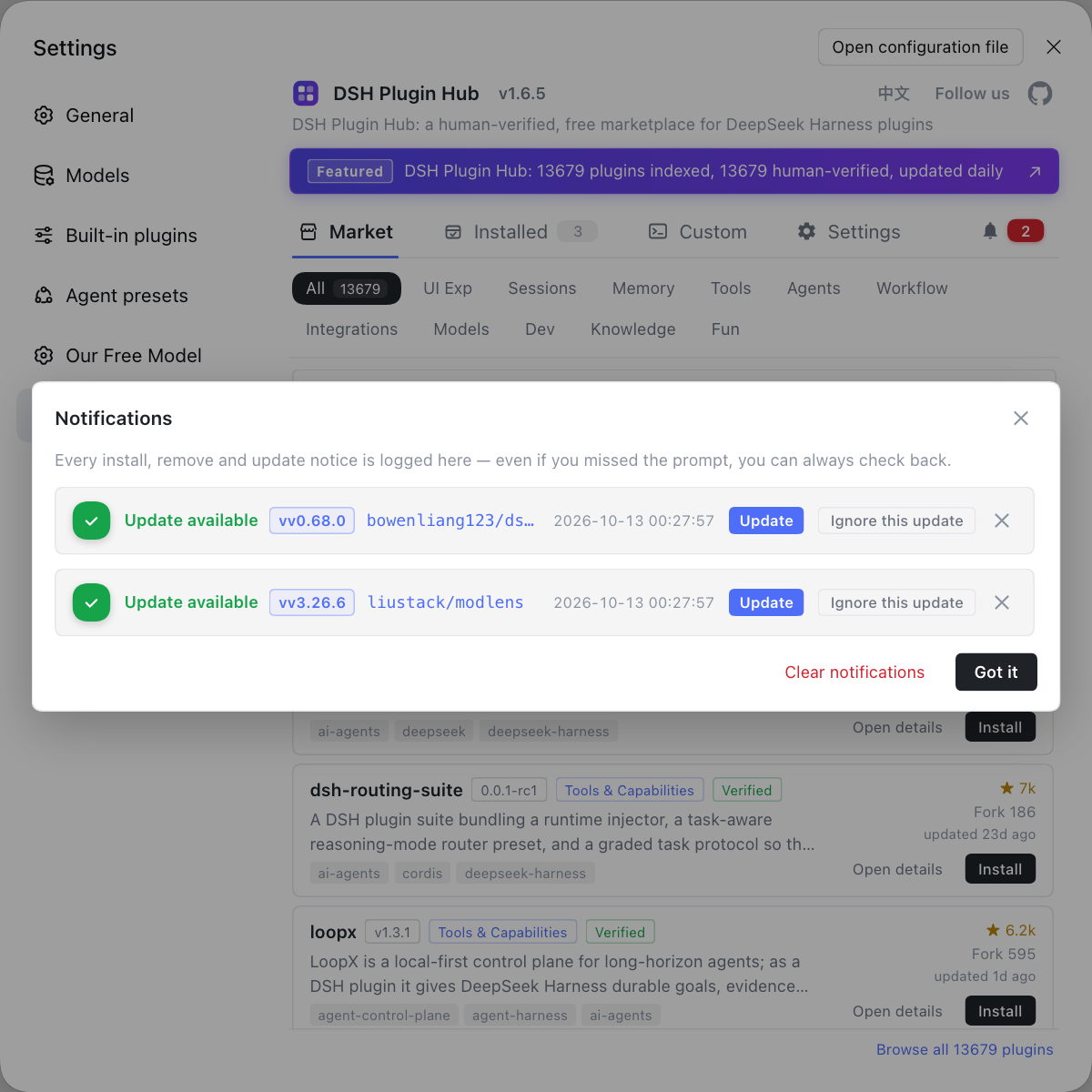
Rather than guessing from a pile of errors which extension dragged the request down, let DSH Plugin Hub put every plugin install and change out in the open: its notification center keeps a trace of each operation, so which plugin was installed and when is all on record, and next time request extension preparation failed appears you can replay it straight against the log.
FAQ
In DeepSeek Harness this means the request failed at the "extension preparation" stage, with the code REQUEST_EXTENSION, thrown before the adapter sends HTTP. Its most typical trait is zero network traffic — the request never went out, so network, auth and quota can all be ruled out first.
The actionable information is in the LlmError cause, but the terminal, the session record and the Web UI currently render only the outermost line and drop the cause. Work backwards from the shape: one class points at an unresolvable plugin package, the other at a manifest that has a name but no version, and each is handled differently.
No. Restarting a session only lets you start a fresh turn; it does not remove the root cause. The good news is that a failed resolution is not cached, so once the underlying problem is fixed the very next request recovers, and a host restart is usually unnecessary.
No. request extension preparation failed reports REQUEST_EXTENSION, and the failure happens before fetch with zero network traffic; transport failed is the transport layer's fallback label, meaning the failure happened at the connection or streaming stage. Whether the request went out is what separates them.
Send once through a pi-ai-hosted route on the same profile. If that route is completely fine while the DeepSeek official route fails every turn, the problem is almost certainly the request-extension contributor unique to the official route, not the network or the model itself.
Related Terms
- REQUEST_EXTENSION
- REQUEST_EXTENSION is the error code DeepSeek Harness throws when a request fails at the extension-preparation stage, with the message DeepSeek request extension preparation failed; it happens before fetch and its hallmark is zero network traffic.— #6497 - One unresolvable active package fails every deepseek-official request (REQUEST_EXTENSION)
- request extension
- A request extension is a mechanism by which DeepSeek Harness attaches diagnostic or contextual information before each request, registered by individual contributors; if any one contributor throws during preparation, the whole turn fails.— #6497 - One unresolvable active package fails every deepseek-official request (REQUEST_EXTENSION)
- cause
- cause is the original error object kept when the LlmError is wrapped by the fallback, and the real package name or manifest path hides inside it; when troubleshooting REQUEST_EXTENSION you should expand cause rather than reading only the outer line.— #7678 - initProfile()'s generated profile manifest lacks version
- request preparation
- The request preparation stage is the flow the adapter runs before the actual fetch, running all request-extension contributors concurrently; it uses Promise.all, so one contributor rejecting drags down the whole batch.— #6497 - One unresolvable active package fails every deepseek-official request (REQUEST_EXTENSION)
Sources
- #6497 - One unresolvable active package fails every deepseek-official request (REQUEST_EXTENSION)· deepseek-ai (GitHub Discussions)
- #7678 - initProfile()'s generated profile manifest lacks version, causing every request on the DeepSeek official route to fail (REQUEST_EXTENSION)· deepseek-ai (GitHub Discussions)