DeepSeek Harness: open/reveal, asar, stderr, Electron host
DeepSeek Harness (DSH) desktop has a whole class of problems that are not "a feature broke" but a mismatch in its contract with the OS shell: the open-in-app list is empty because of one bad registry entry, directories never open, paths in the workspace that go through a link are judged to "have no valid host path", and mapped drive letters are normalized into UNC; in the packaged form the system prompt points into an archive-internal path and the cordis preset's built-in skills are missing wholesale (and the desktop has no visible console, so it is entirely silent); notification clicks do not return to the conversation (the custom scheme is missing the ServiceWorker privilege), plugin runtime errors are invisible (the host forwards only standard output, not standard error); and in a third-party Electron host it fails to start entirely. The shared troubleshooting approach for this family is: first pin down which form it runs in — works from source but reproduces when packaged, or works in the web form but reproduces on the desktop — which basically tells you which section below applies (#8839, #9774, #9697, #9223, #9216, #9756, #9608, #8800, #9543, #9017).
DeepSeek Harness open and reveal: three entry points fail together
DSH plugin open-in-app list is empty: one broken handler drags down the whole batch
In one sentence: the loop that enumerates the system's open handlers reads each application name with no per-item fault tolerance, so a single stale registry entry in the system fails the whole list — even the default open is affected. The error shape is a file-application query failure (#8839).
- Criterion: the menu shows "failed to load applications" and the program list is empty; switching to another set of files is still empty (#8839).
- Common trigger: a stale registry entry left after uninstalling an editor (the discussion's example is a leftover entry after uninstalling WordPad) (#8839).
- Workaround: clean up the leftover registry entry, or use the system default to open the file (#8839).
- Fix: put the try/catch at the per-item read level (skip the bad item and log it) instead of wrapping the whole loop — otherwise one bad item degrades into the whole batch being unusable (#8839).
DeepSeek Harness directories do not open: early return on an empty extension
In one sentence: it returns early when getting the extension, and that extension is exactly the input fed to the system enumeration interface — so a directory gets neither candidate applications nor a default application. The symptom is that "open with an application" always fails for a directory (or any path without an extension) while working normally for files with an extension (#9774).
- Criterion: the same feature works for files but not for directories (#9774).
- Important premise: that interface's documentation itself only promises to handle "files", so the more reasonable fix lands in caller admission — first check whether the target is a directory and give a clear error, rather than loosening the enumeration logic (#9774).
- Handling: switch to "reveal in file manager" (it goes through another path and is not affected by this); or first specify the file inside the directory you want to open (#9774).
DeepSeek Harness paths behind links inside the workspace are rejected
In one sentence: the check directly compares "the path after literal resolution" with "the target identity after resolving the real path" — a link path can never be equal, so it is judged to "have no valid host path". The symptom is that all four entry points fail together — "open in app / open with the default application / reveal in file manager / list available applications" (#9697).
- Criterion: the same path is fine once you avoid the link (use the real path); the four features failing at once is the signature of this one (#9697).
- Handling (user side): open the target with its real path directly (#9697).
- Fix: normalize the link once through its real path before comparing; and add tests — the discussion points out this area has zero test coverage, which is why no one noticed all four entry points breaking together (#9697).
DeepSeek Harness mapped drive letters rewritten as UNC
In one sentence: path normalization calls the system's real-path resolution directly; on Windows it resolves a mapped drive letter into a network path, so both display and persistence become UNC (exposing the host name), and accessing the same directory by drive letter is then judged to be outside the workspace. (#9223)
- Criterion: after adding the workspace, the title and tool paths show a
\\server\share\...form; accessing the same directory with the original drive letter reports "not inside the workspace" (#9223). - Handling: move the workspace to a local drive, or accept the UNC display but note that drive-letter references in scripts need to be adjusted in step (#9223).
- Fix: store "the user's spelling" and "the internal canonical identity" separately — display and persistence keep the drive-letter spelling, while uniqueness judgment still uses the canonical identity, so the same directory does not produce two workspace records (#9223).
DeepSeek Harness packaged (asar) paths: unreachable hints and wholesale skill loss
In one sentence: the three problems share one root — some paths resolve inside the archive (asar) once packaged, and archive-internal paths cannot be read by ordinary file tools or watched as directories; at the same time the desktop has no visible console, so failures appear as silence. (#9216, #9756, #9608)
| Symptom | Mechanism | Handling |
|---|---|---|
| The implementation checkout in the system prompt points inside the archive; agent tools cannot read it and the first turns fail repeatedly | That path is derived by "locating the repo root relative to the current module", and lands inside the archive once packaged (#9216) | Turn off that prompt section (set the relevant switch to off in config), and note a patch replaces the whole line, so you must restate the other keys (#9216) |
| Under the cordis preset, built-in skills are missing wholesale with no error | The preset uses an expression to point the skills directory inside the archive; that directory does not carry the trusted-host marker, so it goes through a channel that cannot read the archive and the failed read is skipped (#9756) | In the profile patch, rewrite the skills directory to a real disk path; the upstream fix is to use a packaged skill-directory configuration that carries the trusted marker (note its sort weight changes) (#9756) |
In cordis mode the <available_skills> directory is never injected (the model does not know skills exist) | An archive-internal directory's stat succeeds, but the directory watch fails, so the whole observation result is marked incomplete and the skills tool treats it as "incomplete, discard" (#9608) | Same as above; the point is "one root's failed watch drags down the whole provider" plus missing observability (#9608) |
Unified handling steps:
- Confirm it is packaging-only: it works from source or in the web form but reproduces on the packaged desktop (#9756).
- Find the config line pointing at the archive: search the profile/preset patches for
app.asarand the skills-directory keys (#9756). - Rewrite it to a real disk path, or switch to a directory configuration that carries the trusted marker (#9756).
- Restart and verify: the skills list appears and the prompt no longer contains an archive-internal path (#9608).
DeepSeek Harness shell capabilities: notifications do not navigate back, plugin errors invisible
DeepSeek Harness notification click does not return to the conversation: the custom scheme lacks the ServiceWorker privilege
In one sentence: the custom scheme does not declare ServiceWorker support when declaring its privileges, so registering a service worker under that scheme's origin is rejected — the notification plugins' "click to jump back to the conversation", "quick approval decision", and similar abilities all fail. The criterion is a message in the console such as "the protocol for the current origin is not supported" (#8800).
- Criterion: the notification pops up but clicking does nothing; the console has an explicit unsupported-protocol message (#8800).
- Handling (user side): use an alternative entry the plugin provides (for example a self-built deep link to raise the window) (#8800).
- Fix: declare that the scheme supports ServiceWorker before the app is ready (a one-line-level change) (#8800).
DSH plugin runtime errors are completely invisible: only standard output is forwarded
In one sentence: the host forwards only the child process's standard output; standard error is written into a fixed-size in-memory ring buffer and can only be read when exiting — when a plugin writes an error with the console it goes through standard error, so a failure that ran for a long time left no log at all. (#9543)
- Criterion: the plugin misbehaves but the log directory is clean; the discussion's example is a scheduled task that failed for hours, whose only signal never reached the log (#9543).
- Plugin-side workaround (currently the most effective): use the log service and register your own output sink, writing messages to your own file; note this cannot see third-party plugins that write straight to standard error (#9543).
- Fix: the host forwards standard error too (the discussion points out the credential concern does not hold — standard output is already forwarded without filtering, and a switch can be added) (#9543).
DeepSeek Harness third-party Electron host: fails to start entirely
In one sentence: a native module has, since some version, built in an Electron runtime fingerprint check, and the allowlist is a patch-level-exact engine fingerprint (yet the error text only shows the major version, which is very misleading); at the same time the startup path calls that module directly, does not check the necessary startup arguments, and has no exception fallback — so even after supplying the argument it still fails fatally. The error shape is a host preparation failure stating the runtime is unsupported (#9017). If the startup failure happens on the official desktop and shows as "tray only, or no window at all", it belongs to the desktop-startup family — see DeepSeek Harness desktop: no window, crash, EMFILE, 80s.
- Criterion: using a third-party Electron binary as node makes any profile fail to start; switching to plain node or the official runtime works (#9017).
- Handling: do not spawn DSH inside a third-party Electron host — start with plain node, or use the official runtime (#9017).
- Cross-reference: this and "the desktop passes
ELECTRON_RUN_AS_NODEthrough to the child process, degrading an Electron application into node" are the inward and outward directions of the same environment variable; look at them together when troubleshooting (#9017).
DSH plugin troubleshooting notes
The first discipline of this family: fix the run form first (source / web / packaged desktop / third-party host), then compare the differences within that form. Nine points:
- "Works from source, reproduces when packaged" = an archive-path problem; do not go checking permissions (#9756).
- "Works in the web form, reproduces on the desktop" = a shell capability or host difference (#9543).
- For a silent failure, suspect the lack of a visible console first, especially on the desktop (#9756).
- Both open-in-app cases are "one exception fails the whole batch"; the key is to find the single item rather than the whole (#8839, #9774).
- Four entry points breaking together = they share one check (#9697).
- For a path problem, suspect first that "normalization changed the user's spelling" (#9223).
- A patch layer replaces the whole line: when changing archive-related config, restate the other keys (#9216).
- Missing skills and unreachable prompt paths often appear together, because they share a root (#9216, #9756).
- State the fix status honestly: all ten are unfixed in the versions the discussions refer to (around
0.2.0-rc.2); this article's handling is all user-side config rewrites, alternative entries, or a different run form, and no official fix has been announced.
Shell-integration problems on the desktop often get tangled up with "which plugins are installed, and which plugin is writing to standard error". Instead of typing commands everywhere, use a visual plugin marketplace such as DSH Plugin Hub: the installed list, install/uninstall history, and system logs are gathered in one panel, so you confirm the environment first.
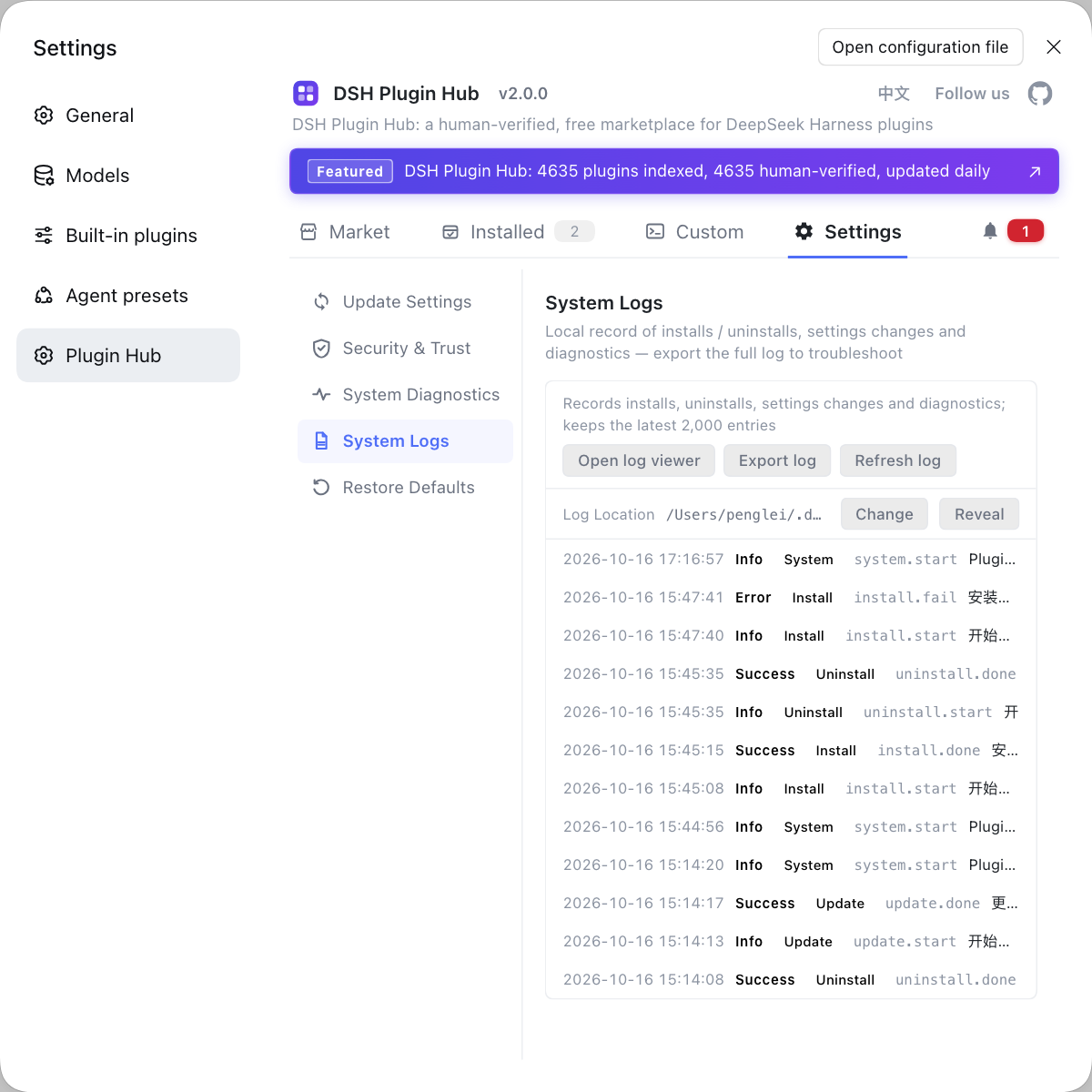
Source: Discussion #8839, Discussion #9774, Discussion #9697, Discussion #9223, Discussion #9216, Discussion #9756, Discussion #9608, Discussion #8800, Discussion #9543, Discussion #9017.
FAQ
In DeepSeek Harness, the open-in-app list goes empty because the loop that enumerates the system's open handlers reads each application's name with no per-item fault tolerance: a single stale registry entry (for example a registry key left behind after uninstalling an editor) fails the entire list. The criterion is that switching to another set of applications is still empty and the error mentions a file-application query failure. The workaround is to clean up the leftover registry entry or use the system default to open; the fix is to catch exceptions per item, skip the bad one, and log it, rather than failing the whole batch.
DeepSeek Harness always fails to "open with an application" for a directory because that path returns early when the extension is empty, and this extension is itself the input passed to the system enumeration interface, so a directory cannot even get "which candidate applications exist", and the default application is empty too. The right fix is to first check at the entry point whether the target is a directory and give a clear error, or add a no-extension branch; note the interface's own documentation only promises to handle "files", so it is more appropriate to branch in the caller.
DeepSeek Harness rejects files reached through a junction or symbolic link because the check directly compares "the path after literal resolution" with "the target identity after resolving the real path", and a link path can never be equal. Four entry points share the same check and this area has no test coverage, so the four features fail together. The workaround is to open with the real path directly; the proper fix is to normalize links once through their real path before comparing.
In the packaged DeepSeek Harness desktop, built-in skills do not appear under the cordis preset because that preset uses an expression to configure custom skill directories, and this expression resolves to a path inside the archive once packaged; those directories do not carry the trusted-host marker, so they go through a channel that cannot read the archive, the read fails and they are skipped. The fix is to use a packaged skill-directory configuration that carries the trusted marker, or rewrite the config to a real path.
DeepSeek Harness desktop shows no runtime plugin errors because the host only forwards standard output; standard error is written into a fixed-size in-memory ring buffer and can only be read when exiting. When a plugin writes an error with the console, it goes through standard error, so a failure that ran for five hours left no log at all. The emergency measure is to have the plugin use the log service and register its own output sink; the root direction is for the host to forward standard error too, or to provide a viewing entry in the UI.
Related Terms
- open in app
- Open in app is the desktop's ability to hand a file to an application registered in the system. It is implemented by enumerating the available handlers in the system and taking their names and identifiers. If any item's exception is not caught per item during enumeration, the whole list fails.— https://github.com/deepseek-ai/deepseek-harness/discussions/8839
- asar archive path
- asar is the archive format used when packaging an Electron application, and its paths behave as a virtual filesystem at runtime. It can be accessed by some read interfaces but cannot be used normally by mechanisms such as directory watching, so pointing a skills directory or checkout directory inside the archive causes reads or watches to fail.— https://github.com/deepseek-ai/deepseek-harness/discussions/9756
- trustedHost
- trustedHost is a marker on a DeepSeek Harness skills-directory configuration meaning that the directory should be accessed through the native filesystem channel (which can read the archive directly). Custom skill directories do not carry this marker by default, so they are routed to another read channel and then fail on an archive path.— https://github.com/deepseek-ai/deepseek-harness/discussions/9756
- custom scheme privileges (registerSchemesAsPrivileged)
- registerSchemesAsPrivileged is the Electron interface for declaring a custom scheme's capabilities before the app is ready, and it can declare privileges such as standard, secure, and ServiceWorker support. Without the ServiceWorker privilege declared, registering a service worker under that scheme's origin is rejected.— https://github.com/deepseek-ai/deepseek-harness/discussions/8800
Sources
- #8839 — "open in app" breaks due to one broken handler — windowsFileApplications fails on a stale COM handler· deepseek-ai (GitHub Discussions)
- #9774 — native-command: openNativeFileApplication always fails for directories· deepseek-ai (GitHub Discussions)
- #9697 — session's openWorkspacePath / workspacePathApplications always reject files whose path contains a junction or symbolic link· deepseek-ai (GitHub Discussions)
- #9223 — Windows workspace path does not preserve the mapped drive-letter spelling· deepseek-ai (GitHub Discussions)
- #9216 — Packaged desktop: the implementation checkout advertised in the system prompt points into app.asar's virtual path· deepseek-ai (GitHub Discussions)
- #9756 — Desktop cordis preset: built-in skills do not load — !!js customSkillDirs resolves inside app.asar· deepseek-ai (GitHub Discussions)
- #9608 — Desktop Creator (cordis) mode: the <available_skills> directory is never injected· deepseek-ai (GitHub Discussions)
- #8800 — dsh-app:// protocol is not registered with the ServiceWorker privilege, disabling notification plugins wholesale· deepseek-ai (GitHub Discussions)
- #9543 — Desktop: host stderr is never forwarded· deepseek-ai (GitHub Discussions)
- #9017 — Third-party Electron host (Electron-as-node): dsh fails to start entirely· deepseek-ai (GitHub Discussions)