dsh figma explained: DeepSeek Harness DSH plugin design
dsh figma refers to the design-file access class of DSH plugins in the DeepSeek Harness ecosystem — they wire Figma designs or drawing flows into the session so the agent can read a design, pull copy and compile animations without shuttling files between external tools (source). The community does have Figma-related implementations, and this article works through three directions — what they solve, how to install and use them, and fit versus alternatives.
DSH plugin overview: where design-file plugins sit
The position of design-file DSH plugins is to connect design-side assets with a Harness session. Two lines cover it:
| Line | What it does | Representative |
|---|---|---|
| Design-file access | Read a Figma design, extract copy and structure | dsh-figma-mcp |
| Design-asset compilation | Compile SVG / keyframes into an animation file | dsh-figma-to-lottie |
Remember this first: one line reads designs "in", the other compiles design assets "out". This article unfolds over three directions: what they solve, how to install and use them, and fit versus alternatives.
What DSH plugins solve: wiring design files and drawing flows into Harness
What these DSH plugins solve is the friction of "asset shuttling" between design and development. Three things get filled in:
- Remove manual configuration — a traditional MCP client needs you to build tokens and write request headers by hand, which is error-prone; a design-access plugin compresses that into one click on a card (source). Expected: authorization goes from fiddling for a long time to one click.
- Let the agent read the design directly — after authorization the agent can call tools to read design content and extract copy inside the conversation flow. Expected: design information can be referenced directly by the session.
- Turn design assets into code-usable files — describe an animation in natural language and the agent calls a compile tool to produce usable animation JSON, without opening design software (source). Expected: a design asset quickly becomes a front-end-usable artifact.
Its direction differs from office-suite plugins: office suites lean toward producing documents and spreadsheets, while design-file access leans toward reading designs and emitting assets. The two do not overlap, so pick by the artifact you actually need rather than by category name.
One rule of thumb helps: ask what you want to hold at the end. If the answer is copy and structure pulled from a design, that is the read-in line; if it is an animation file a front end can drop in, that is the compile-out line; if it is a diagram you can inspect or a deck you can present, it is one of the alternatives. Naming the artifact first keeps you from installing a plugin that solves a neighbouring problem.
How to install and use a DSH plugin: Figma auth, Lottie compile, local preview
Installation all goes through the standard command or the plugin market, and the key to using them is authorization and tool calls. Step by step:
- Install the Figma authorization plugin — run
dsh plugin --profile web add dsh-figma-mcp, or search figma in DSH Plugin Hub to find dsh-figma-mcp. Expected: the plugin enters the web profile with no install error. - Restart and authorize with one click — restart
dsh web, click authorize on the settings card, and complete a browser OAuth round. Expected: the card shows a connected state; the token refreshes silently when near expiry, and local credentials are cleared on disconnect. - Read a design in the session — after authorization, have the agent call the
mcp__figma__*tools to read a design and extract copy. Expected: the agent returns the text and structure information from the design. - Install the Lottie compile plugin and generate an animation — install dsh-figma-to-lottie with
dsh plugin --profile web add github:zimai233/dsh-figma-to-lottie, then describe an animation in natural language and have the agent compile a.lottie.json. Expected: a usable Lottie JSON is produced, supporting rectangle, path, image and text layers. - Use a local preview plugin to view diagrams — when you need to view a flowchart, install dsh-drawio and click a
.drawiofile from the file tree to render it in the sidebar. Expected: the diagram is visible directly instead of facing mxGraph XML source.
Taken together, these five steps cover the whole path from "read a design in" to "compile an asset out": authorization first, then tool calls, then a local way to inspect the result. None of them require editing the plugin source — the workflow lives in the session.
The four-state card of dsh-figma-mcp
dsh-figma-mcp folds authorization into a settings card that shows four states, so you never memorize a command. One card, four states:
- Not connected — the card says it is not connected yet; click Authorize to launch the browser OAuth, sign in to Figma and grant the app. Expected: the card turns to connected once authorization completes.
- Connected — the card shows connected plus token status, and the agent can now call the
mcp__figma__*tools to read a design and extract copy. Expected: the session returns the design's text and structure. - Renewing — when the token nears expiry the card refreshes silently with no browser reopened; if the refresh fails it falls back for re-authorization. Expected: a long-running session does not drop easily.
- Disconnected — on a manual disconnect or an expired authorization the card clears the credentials stored locally. Expected: no Figma credential remains on the machine.
Every one of these maps to the plugin entry: one-click OAuth, a token-status card, silent refresh and re-authorization, full token copy, and local credential cleanup on disconnect, installed with the standard dsh plugin --profile web add dsh-figma-mcp (source).
The four layer types of dsh-figma-to-lottie
dsh-figma-to-lottie compiles SVG paths and keyframes into a self-contained .lottie.json, generated by the agent through lottie_compile, and supports four layer types: rect, path, image and text. Each layer takes its own parameters:
- Rectangle (rect) — position, size and corner radius, for color blocks, button bases and cards. Expected: the produced JSON contains the matching rectangle shape layer.
- Path (path) — takes the SVG path data (
d) and turns the vector outline into a Lottie shape. Expected: complex outlines play along their path. - Image (image) — references a bitmap asset and size to place an external image in the animation. Expected: the animation contains a bitmap layer.
- Text (text) — sets content, font and size so text enters with the animation. Expected: the text layer shows along the timeline by keyframe.
It needs zero build steps and is pure ESM, so once installed you describe an animation in conversation without opening any design software — which is exactly the difference from the "read a design in" line: one reads in, the other compiles out (source).
DSH plugin fit and alternatives: drawio and PPT builds
If neither Figma line fits your scenario, turn to drawing and document alternatives. Compare:
- Diagram-preview alternative — dsh-drawio renders a
.drawiosource file into a flowchart in the web sidebar; it is read-only and lazy-rendering, compatible with both plain and compressed save formats, and renders entirely locally with no data leaving the machine (source). Good for: people drawing flowcharts and architecture diagrams rather than UI designs. - Presentation alternative — dsh-ppt-studio turns Markdown or an attachment into self-contained HTML slides, an editable
.pptxand a JSON manifest, with five built-in themes and support for a company master (source). Good for: people who want a deck rather than a design file. - How to judge which line to use — to read a design source and get copy and structure, choose Figma access; to produce an animation asset, choose Lottie compilation; to see a diagram beyond its source, choose drawio; to produce a presentation from text, choose a PPT build. Expected: you match the artifact type instead of forcing a fit.
One more dimension to judge by: whether the data has to leave your machine. dsh-figma-mcp goes through OAuth, the only line here that needs an authorized network connection; dsh-drawio renders entirely locally with no data leaving the machine, which is steadier for sensitive diagrams; dsh-ppt-studio produces slides and an editable .pptx locally from Markdown and depends on no external design tool. Weighing "what artifact you want" together with "where the data is processed" makes it hard to install the wrong thing (source).
Notes and limits for using DSH plugins
Design-file DSH plugins (DeepSeek plugins) are handy, but a few boundaries deserve knowing. Item by item:
- Keep credentials inside the plugin: complete Figma authorization over OAuth, and never paste a token into chat or a public config.
- Authorization expires: a token can go stale, the card supports re-authorization and silent refresh, and on disconnect check that local credentials are fully cleared.
- Local rendering is steadier: an implementation that renders fully locally, such as drawio, keeps data off the network, which is reassuring for sensitive diagrams.
- Capability has edges: Figma access leans toward reading and Lottie compilation leans toward converting, so do not expect one plugin to handle the whole design-to-ship flow.
- Preview-stage compatibility: DeepSeek Harness is still in preview, so check the compatible version on the entry before installing and look for an update first when something breaks after an upgrade.
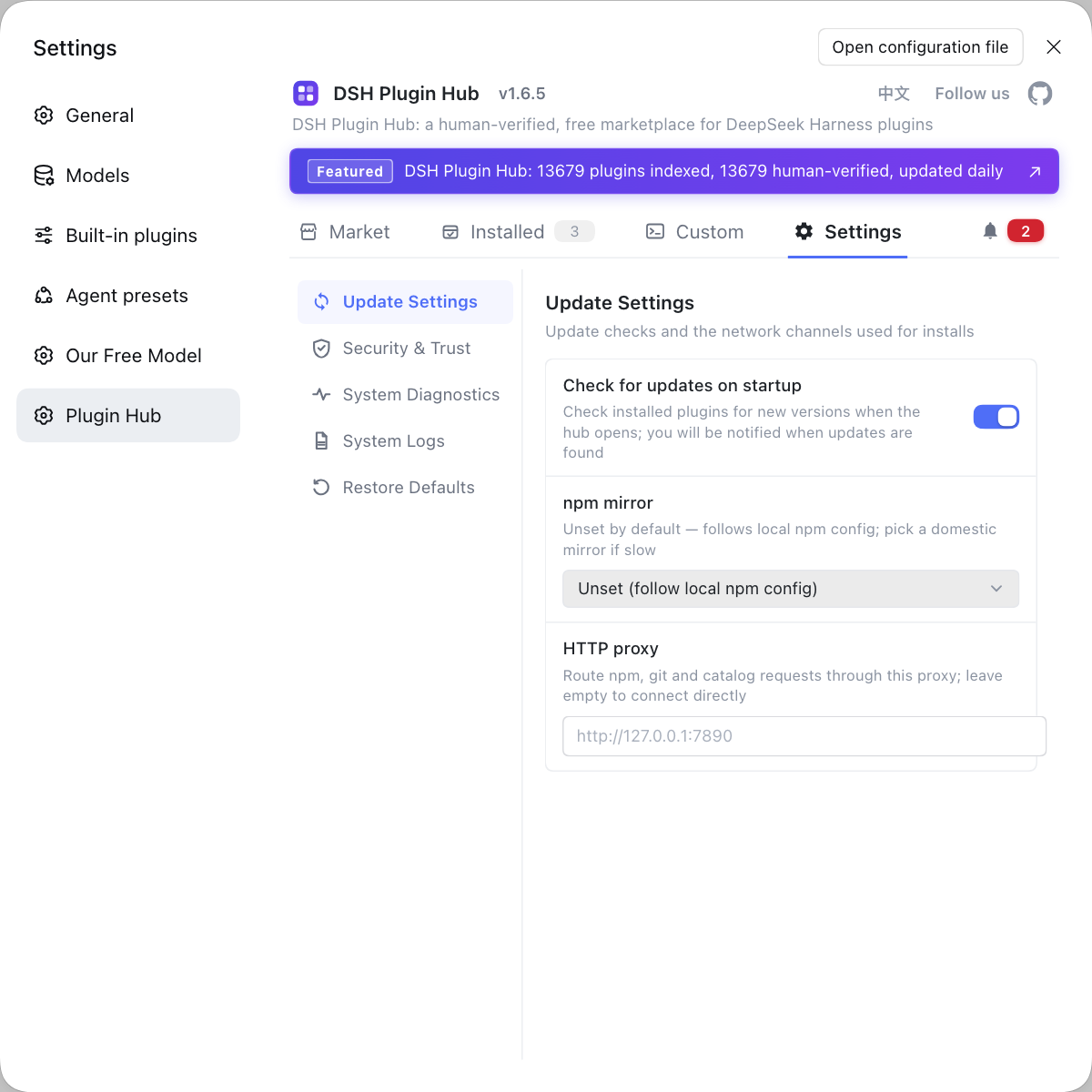
These plugins are also, at heart, installing and managing plugins — rather than hunting Figma, drawio and PPT packages across multiple repos and configuring each by hand, let DSH Plugin Hub, the official community market for DeepSeek Harness at https://dsh-plugin.org/, gather them: browsing, one-click install, uninstall and update detection in one place, with proxies and mirrors configured on the Settings page.
Sources: dsh-figma-mcp (dsh-plugin.org), dsh-figma-to-lottie (dsh-plugin.org), dsh-drawio (dsh-plugin.org), dsh CLI README.
FAQ
dsh figma refers to the class of DSH plugins in the DeepSeek Harness ecosystem that bring design files and drawing flows into the session, and the community does have Figma-related implementations, such as dsh-figma-mcp for Figma authorization and MCP access. It puts design capability into the session so the agent can read design content, extract copy or generate code without hand-building tokens and request headers.
Figma-class DSH plugins mainly do two things: read a design file into the session, or compile design assets into usable files. dsh-figma-mcp connects Figma with one-click OAuth, and after authorization the agent can call mcp__figma__* tools to read a design and extract copy; dsh-figma-to-lottie compiles SVG paths and keyframes into a self-contained .lottie.json animation file.
dsh-figma-mcp installs with the standard command, and after a restart you authorize it with one click on the settings card; if the token expires you re-authorize on the card. Run dsh plugin --profile web add dsh-figma-mcp, restart dsh web, then click authorize once in settings to connect Figma; the card shows token status, supports silent refresh, and clears local credentials on disconnect.
When no Figma-class DSH plugin fits your need, turn to drawing and document alternatives: dsh-drawio previews .drawio flowcharts in the sidebar, and dsh-ppt-studio turns Markdown into HTML slide decks and PPTX. The former solves the problem that a diagram can only be read as source, the latter solves layout output for presentations — both point in a different direction from design-file access.
Two things matter with design-file DSH plugins: complete authorization inside the plugin and never paste a token into chat, and read design data on demand and process it locally. dsh-figma-mcp clears local credentials on disconnect, and dsh-drawio renders entirely locally with no data leaving the machine, so following that kind of guidance is safer.
Related Terms
- dsh figma
- dsh figma is the umbrella term in the DeepSeek Harness ecosystem for design-file access class DSH plugins, covering authorized connectors that read a Figma design into the session and tools that compile design assets into animation files, so an agent can work with designs in conversation.— dsh-figma-mcp (dsh-plugin.org)
- dsh-figma-mcp
- dsh-figma-mcp is a Figma authorization and MCP access DSH plugin for DeepSeek Harness that compresses the manual work of building tokens and writing request headers into one click on a plugin card, after which the agent can call mcp__figma__* tools to read a design.— dsh-figma-mcp (dsh-plugin.org)
- MCP
- MCP is a protocol that lets AI applications connect to external tools and data sources, and a DSH plugin can use it to bring external capabilities such as Figma into DeepSeek Harness. dsh-figma-mcp exposes design capability as agent-callable tools over MCP.— dsh-figma-mcp (dsh-plugin.org)
- Lottie
- Lottie is a JSON-based vector animation format that plays lightly on the web and mobile. dsh-figma-to-lottie compiles SVG paths and keyframes into a self-contained .lottie.json file.— dsh-figma-to-lottie (dsh-plugin.org)
Sources
- dsh-figma-mcp (dsh-plugin.org plugin entry)· dsh-plugin.org
- dsh-figma-to-lottie (dsh-plugin.org plugin entry)· dsh-plugin.org
- dsh-drawio (dsh-plugin.org plugin entry)· dsh-plugin.org
- dsh CLI README (plugin add semantics)· deepseek-ai