DeepSeek Harness subagents: product-error, stale entries
DeepSeek Harness (DSH)'s subagents have a clear gap between "very convenient when they work and very hard to diagnose when they break". This batch of threads has four typical forms: failure returns only one line, Product subagent failure (product: Codex; stage: turn; category: product-error), with no underlying detail; the same task completes with the Codex CLI but fails with subagent_codex (the bundled Codex is older than the user's config); after deleting the subagent's session directory the UI entry still cannot be cleared; and the most severe one — a continuable subagent throws while reading the inbox at the settle stage and takes the whole process down as a fatal exit (exit 1), reproducing after about a dozen minutes. The first three are "diagnosable but with a threshold", the last is a "stability problem" and has the highest priority (#9640, #9346, #9552, #8849). Also, if a subagent's symptom is that the control-class tools act as if they were swapped and addressing by id fails, that belongs to the separate "tools replaced by the Team build" family — see DeepSeek Harness: duplicate list_agents, stuck subagents.
DSH plugin only product-error: details are folded away at the projection stage
The one-line conclusion: the adapter folds several different underlying errors into product-error together, discarding the real error identifier at that step; the diagnostic rendering then outputs only fixed fields — although the full cause is still kept on the failed instance, nothing reads it. So what you get is always a category name with no information (#9640).
DSH plugin four steps to fish out the details
- First confirm "the same task succeeds through a different entry point": if the same task completes when run directly with the Codex CLI, the problem is in the adapter layer's communication/classification, not the task itself (#9640).
- Capture the app-server traffic. The community plugin
@argszero/dsh-codex-wire-capturetees and saves the app-server's stdout, thereby capturing the folded-awaycodexErrorInfo(#9640):
npm i @argszero/dsh-codex-wire-capture
- Look up the meaning of the error identifier you got, then decide whether it is an unsupported model, an invalid parameter, or a failure caused by an upstream rollback (#9640).
- Read the boundary of
stage: turn: it can only tell you "the failure is in this round's execution stage", and cannot substitute for the specific error; seeing it should not stop you (#9640).
DSH plugin version mismatch: bundled Codex is older than your config
The one-line conclusion: subagent_codex reuses the local Codex config file (for example the default model name), while the host's bundled Codex binary may be an older version that cannot read that model, so it fails at startup or on the first round — the same task succeeds with the CLI precisely because it uses your newer local version. (#9346) This kind of "the subagent runs a model or version different from what you assumed" mismatch (including model inheritance and reasoning effort not propagating) is covered in more detail in DeepSeek Harness subagent inherits the wrong model.
DSH plugin diagnostic quartet (align these four and the problem usually shows immediately)
- The resolved executable path: confirm which Codex the subagent actually calls, not the one you assume.
- Its version number: run
codex --versiondirectly and compare it with the host's bundled version. - The effective
CODEX_HOME: confirm which config file is read (there may be several on the same machine). - The resolved model name: compare the default model declared in the config file against "the models that version supports" (#9346).
DSH plugin three ways to handle it
- Make the subagent use only a model the bundled version supports (temporarily usable, smallest change) (#9346).
- Switch to a newer Codex executable: the workaround given in the thread, already verified on Windows, is to back up and rewrite the function in the plugin that constructs the Codex launch arguments so it points to a newer Codex (this is a local edit and will be overwritten when you upgrade the plugin) (#9346).
- Verify: rerun the same task, expecting the subagent to start and complete normally; if it still fails, return to the quartet and keep aligning (#9346).
DSH plugin: deleted the session directory, the UI entry remains
The one-line conclusion: the subagent record is now "a catalog event written into the parent session log + a projection", and none of the four layers — event, projection, query, and tool — has a removal path — the record is append-only, so deleting the on-disk directory does not make the UI entry disappear. The thread ran a comparison on the same UUID: doing this in August worked, but from October (0.2.0-rc.2) on it does not (#9552).
DSH plugin handling
- Confirm the criterion: after deleting the subagent's session directory, neither refresh nor restart clears the entry; yet the workspace list and the session file itself are normal (#9552).
- There is no user-side workaround for now: the thread states explicitly that a plugin cannot do it either — the fold logic ignores other event types, and a client plugin can at most do a display-layer hide (#9552).
- An acceptable alternative: archive or rename the subagent sessions you no longer need, and use "filter/sort" to reduce the noise, rather than trying to delete the record.
- The requested direction (for upstream feedback): add a
subagent/retire-style event + filter it during folding + have query and tools follow (#9552).
DSH plugin settle-time exception crashes the whole process
The one-line conclusion: when a continuable subagent reads the inbox at its settle stage, the read function throws directly when the state yields no value, and the settle logic that calls it is an uncaught async immediately-invoked function — the exception escapes as an unhandled rejection and the whole process exits fatally. The tell is that it reproduces after about a dozen minutes and the crash stack maps to two source locations, the inbox read and the settle activation (#8849).
DSH plugin four steps to handle it (by priority)
- Confirm the criterion: the host exits without warning after a dozen or so minutes with exit code 1; the logs show an unhandled rejection whose stack points to the inbox read and the settle activation (#8849).
- Workaround (currently the only effective one): roll back to an older version that does not enable the continuation / activation mechanisms — the problem is on that settle path (#8849).
- When rollback is impossible: use an external supervisor process to restart it automatically, downgrading "unusable" to "recoverable"; but note this interrupts all in-flight sessions (#8849).
- Remember two layers of defect: one, the read path should not throw when the state is undefined; two, the top-level async immediately-invoked function must have a fallback. The thread also notes that "missing logs" is itself a defect, because there is no usable clue before the crash (#8849).
DSH plugin troubleshooting notes
The recommended troubleshooting order for subagent problems: rule out "process-level stability" first (will it exit on its own), then "version mismatch", and only then "insufficient diagnostic information". Eight points:
- An exit that reproduces after a dozen minutes should be treated as a fatal exit first, not spent on diagnosing the message text (#8849).
product-errormeans "classification failed", not "product defect" (#9640).stage: turnonly narrows the scope, it does not locate the cause (#9640).- "CLI works, subagent does not" is the fingerprint of a version mismatch (#9346).
- The diagnostic quartet must be read together: executable path, version,
CODEX_HOME, and model name; missing any one makes misjudgment easy (#9346). - A local edit to a plugin file will be overwritten on upgrade; write it into your own change list (#9346).
- The subagent record is append-only: deleting the directory ≠ deleting the record, so stop expecting a restart to clear the UI entry (#9552).
- State the fix status honestly: all four are unfixed in the version discussed (
0.2.0-rc.2); the community plugin can patch diagnostics (capture the wire), but version mismatch, entry retirement, and settle crash all need core-side changes.
Subagent problems like these are often directly tied to "what is installed and at what version", especially the version-mismatch item. Instead of typing commands everywhere to compare versions, use a visual marketplace like DSH Plugin Hub: the installed list carries version numbers and source markers, and install/uninstall history and system logs sit in one panel, so you first confirm "what version each component in this environment is".
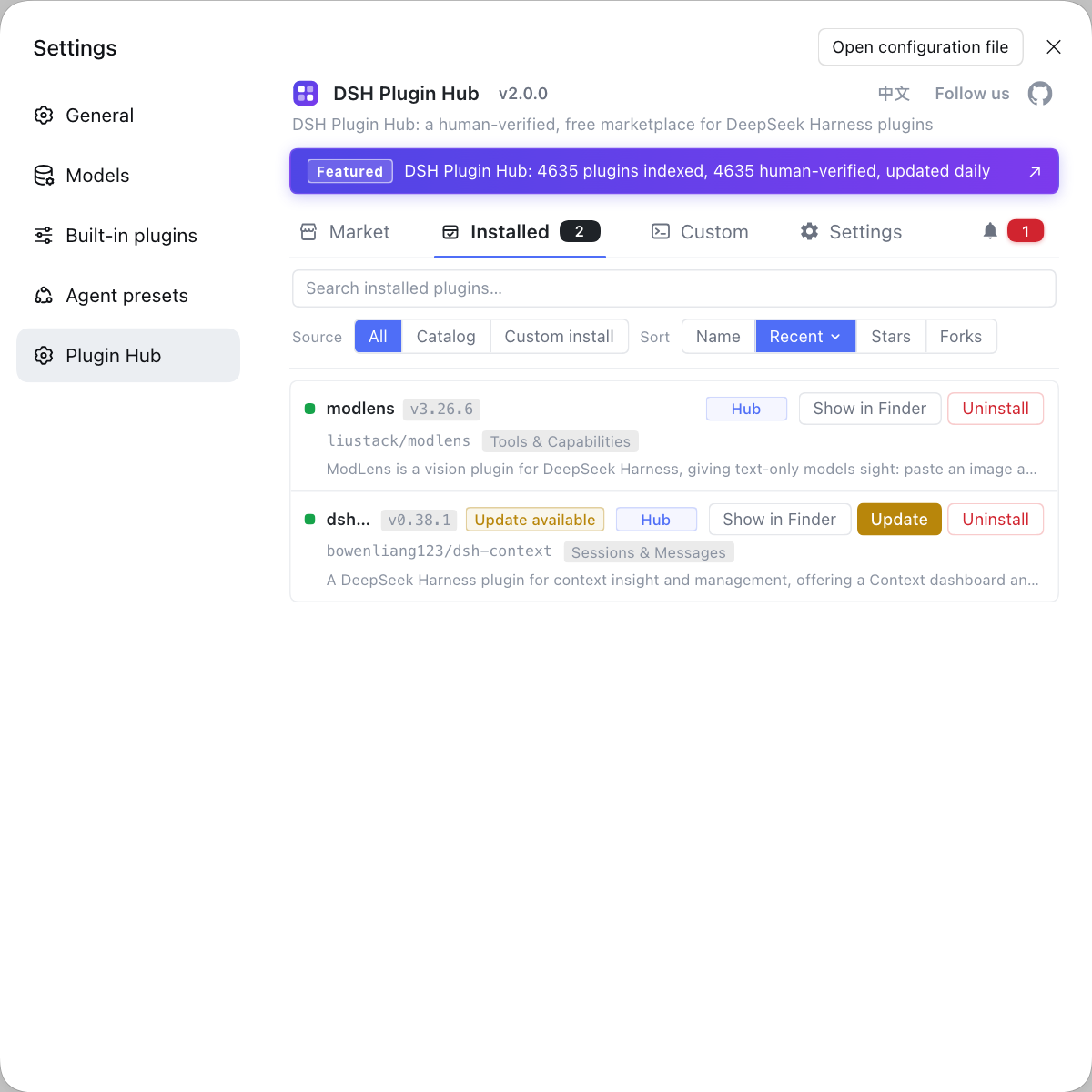
Source: Discussion #9640, Discussion #9346, Discussion #9552, Discussion #8849.
FAQ
In DeepSeek Harness, that thin message appears because the diagnostic information is folded away at the projection stage. The adapter folds several different underlying errors into product-error together, discarding the real error identifier at that step; the diagnostic rendering then outputs only fixed fields, and although the full cause is kept on the failed instance, nothing reads it. A workable approach is to use a community plugin that captures the app-server traffic to fish out the real error identifier, then look up its upstream meaning.
In DeepSeek Harness, a typical cause is that the host's bundled Codex binary is older than the model you configured locally. The subagent reuses the local Codex config file (for example a default model name set to a model only newer versions support), and the old runtime cannot read that model, so it fails at startup or on the first round. The criterion is to look at the executable path the host resolves to and its version, plus the model name actually used after resolution; once these four things (executable path, version, CODEX_HOME, model name) are aligned, the problem is usually obvious.
In DeepSeek Harness, the entry stays because the subagent record is now written as a catalog event in the parent session log plus a projection. Deleting the directory produces no 'retire' event, and none of the four layers — event, projection, query, and tool — has a removal path. That is, this record is append-only, so the UI naturally cannot clear it; there is no usable user-side workaround for now, and a plugin cannot do it either, because the fold logic ignores other event types.
In DeepSeek Harness, this happens because the subagent settle stage no longer guards the inbox read with an exception handler. When the inbox state yields no value the read function throws directly, and the settle logic that calls it is an uncaught async immediately-invoked function, so the exception escapes as an unhandled rejection and takes the whole process down. The tell is that it reproduces after roughly a dozen minutes and the crash stack maps to two source locations, the inbox read and the settle activation.
In DeepSeek Harness, rolling back to an older version that does not enable the continuation and activation mechanisms sidesteps it, because the problem is on that settle path; if you cannot roll back, accept that 'the process will exit on its own' and rely on an external supervisor to restart it. Note this does not change the root cause, it only turns 'unusable' into 'recoverable'.
Related Terms
- subagent_codex
- subagent_codex is the DeepSeek Harness implementation that uses Codex as the subagent backend. It talks over Codex's app-server protocol and classifies failures into a number of product-level categories. Over-folding of the classification causes detail loss, which is the direct cause of 'only product-error is reported'.— https://github.com/deepseek-ai/deepseek-harness/discussions/9640
- subagent/catalog event
- subagent/catalog is the event type DeepSeek Harness writes into the parent session log to record the subagent catalog, working with the subagentCatalog projection to feed the UI. It is an append-only record with no corresponding retire or removal event, so deleting the on-disk directory does not make the UI entry disappear.— https://github.com/deepseek-ai/deepseek-harness/discussions/9552
- continuable subagent
- A continuable subagent is a form of subagent in DeepSeek Harness that can be continued; the parent reads the inbox at its settle stage to receive results. This settle path lacks an exception guard, and it is the chain along which 'a subagent drags down the whole process' happens.— https://github.com/deepseek-ai/deepseek-harness/discussions/8849
- stage: turn
- stage: turn is the stage field in a subagent failure message, meaning the failure happened in 'this round of execution' rather than at startup. It narrows the search scope, but because multiple underlying errors are folded into the same stage, it alone is not enough to pinpoint the specific cause.— https://github.com/deepseek-ai/deepseek-harness/discussions/9640
Sources
- #9640 — subagent_codex returns only Product subagent failure (stage: turn / category: product-error) on repeated failure, with no underlying detail· deepseek-ai (GitHub Discussions)
- #9346 — Codex subagent can fail when DSH's bundled Codex is older than the user's configured model· deepseek-ai (GitHub Discussions)
- #9552 — Regression: from 0.2.0-rc.2 on, deleting a subagent session directory no longer clears its UI entry· deepseek-ai (GitHub Discussions)
- #8849 — A failed projection registration at subagent settle makes the whole process exit fatally (fatal load failure / exit 1)· deepseek-ai (GitHub Discussions)