DSH plugin: missing attachment misreported as TRANSPORT
The symptom is deceptive: every message in the session fails with DeepSeek Messages transport failed (TRANSPORT) and backs off with 5 retries (0.5s→8s), looking like a network or proxy problem — but that error code points in the wrong direction. Its real cause is that a local attachment object was deleted: attachment-local throws a precise ATTACHMENT_NOT_FOUND when the filesystem reports ENOENT, but it gets wrapped unconditionally as TRANSPORT in the adapter's catch-all; and since prepareImages re-reads all images referenced by the session on every request, one missing object makes every request in that session fail, and get retried 5 times. The way to tell is to look at the HTTP request count: it is 0 for this issue, with each attempt failing in 6–20ms. More seriously, attachments are content-addressed, so a deletion with no backup cannot be undone — this session will be permanently unable to send messages.
Triage first: it reports TRANSPORT, but it is not a network problem at all
Bottom line up front: treat "zero HTTP requests" as the first criterion, and you eliminate network, proxy, certificates, auth, and quota in one step. The report stresses specifically that this evidence should go at the very front of the article — otherwise the name TRANSPORT will bias you and lead you in a completely wrong direction (#7834).
Confirm in four steps:
- Look at the error code and message:
code: TRANSPORT, messageDeepSeek Messages transport failed. - Look at whether a request went out: if the HTTP request count is 0, the failure happened at the local preparation stage. This is the decisive criterion.
- Look at how fast it fails: this issue fails in 6–20ms per attempt (a purely local error, no network round trip).
- Look at the retry chain: each failing step leaves 5
llm/retryentries in the session log, backing off 0.5s→8s — and the retries fail too. Retrying a "local file does not exist" error 5 times is pure latency.
The minimal reproduction is only three steps (#7834):
- In a session, have the model read an image — the attachment is copied into
$DSH_HOME/attachments/v1/objects/<first two sha256 chars>/<sha256>and the session history references it byattachmentId. - Delete those object files.
- Continue sending messages in the same session.
Result: the request throws at the local preparation stage, turn/end's reason is {"kind":"error","error":{"code":"TRANSPORT","message":"DeepSeek Messages transport failed"}}, 5 llm/retry entries appear in the log, and no HTTP request is ever sent. A new session is unaffected, because it does not reference these attachments.
Root cause: a missing content-addressed attachment object gets misreported as a transport failure by the catch-all
The combination of two points creates the misdirection: the attachment layer throws a precise ATTACHMENT_NOT_FOUND, and the adapter's catch-all treats any non-LlmError from the request-preparation stage as a transport failure and wraps it as TRANSPORT. The real code is in fact fully preserved in cause; it just never appears at the user-visible layer.
The real throwing point (packages/attachment/attachment-local/src/store.ts:443):
if (error instanceof Error && 'code' in error && error.code === 'ENOENT')
  throw new AttachmentError('Attachment object is missing.', 'ATTACHMENT_NOT_FOUND')
The misreport point (packages/llm/llm-deepseek/src/adapter.ts:66):
throw new LlmError('DeepSeek Messages transport failed', 'TRANSPORT', { cause: error })
Note that cause is preserved ({ cause: error }) — that is, ATTACHMENT_NOT_FOUND is not lost, it is just buried under the outer sentence. This is both the problem and the basis for the minimal fix: surface the cause's code and troubleshooting will no longer be misdirected toward the network (#7834).
The amplification mechanism is prepareImages in packages/llm/llm-deepseek/src/images.ts: it re-reads all images referenced by the session on every request (deduping/caching by attachmentId). So:
- one missing object → every request in that session fails, not just once;
- a new session does not reference these attachments → completely fine;
- because
TRANSPORTis in the default retryable set, each failing step also pointlessly retries 5 times.
Why this is far more serious than "a hard-to-understand error": attachments are content-addressed, with paths like $DSH_HOME/attachments/v1/objects/<first two sha256 chars>/<sha256>, where the filename is the content hash. Once deleted with no backup, the user cannot rebuild it — this session will be permanently unable to send messages. That is the crux of the severity argument. The same reasoning applies to "attachment library cleanup": the cleanup action carries a hidden consequence, that deleting some object bricks the active sessions referencing it.
Fix one: make the failure report under the attachment's own identity
The first step is a small change: translate the attachment error at the read point, keep the attachment's own code, and name which attachment it is in the message. That makes the error accurate and removes the retries, but the session still fails — it solves "misdirection", not "bricking".
The patch lands in llm-deepseek/src/images.ts: add a readRequestImage wrapper that translates AttachmentError into an LlmError carrying the original code:
async function readRequestImage(
  attachments: AttachmentStore, ref: ImageAttachmentRef, target: ImageRequestTarget, signal: AbortSignal,
): Promise<RequestImageAttachment> {
  try {
    return await attachments.readImageRequest(ref, target, signal)
  } catch (error) {
    if (!(error instanceof AttachmentError)) throw error
    throw new LlmError(
      `DeepSeek Messages could not prepare image attachment ${ref.name ?? String(ref.attachmentId)}: ${error.message}`,
      error.code,
      { cause: error },
    )
  }
}
The call site correspondingly computes target first and goes through the wrapper:
if (!versions.has(ref.attachmentId)) {
  const target = resolveRequestImageTarget(model, ref)
  versions.set(ref.attachmentId, await readRequestImage(attachments, ref, target, signal))
}
The reporter also added an assertion test verifying three things hold together: the code is ATTACHMENT_NOT_FOUND, the message contains the attachment name, the cause chain preserves the original AttachmentError, and the provider received no request. Verification result: runtime.spec.ts + files.spec.ts 171 passed, store.spec.ts 12 passed, both tsc -b runs 0 errors (#7834).
Why keeping the original code also removes the retries: ATTACHMENT_NOT_FOUND is itself not in the default retryable set. Restoring it from TRANSPORT back to itself means the retry policy naturally stops backing off 5 times for this error.
Fix two: downgrade unavailable attachments to placeholder text, do not brick the whole session
Fix one makes the failure "report accurately" without changing behavior: as long as an attachment object is gone, the session referencing it still fails every request (resuming an old session hangs too). The more thorough approach is to reuse the repo's existing "offload an image to text" mechanism, projecting that unavailable image into a line of placeholder text while the other images are handled as usual.
The mechanism is already available: offloadedImageText(ref, access?) in packages/llm/llm/src/content.ts (placeholder text shaped like [image omitted to fit request image limits; <identity>. …]) and projectOffloadedImages(messages, placeholder). The reporter added two functions in the same shape (#7834):
export function unavailableImageText(ref: ImageAttachmentRef): string {
  return `[image unavailable: its stored attachment object cannot be read; ${imageIdentity(ref)}. Ask the user to attach it again if needed.]`
}

export function projectUnavailableImages(
  messages: readonly RequestMessage[],
  unavailable: ReadonlySet<ImageAttachmentRef['attachmentId']>,
  placeholder: (ref: ImageAttachmentRef) => string,
): readonly RequestMessage[] {
  if (unavailable.size === 0) return messages
  return messages.map((message) => {
    const content = replaceUnavailableImages(message.content, unavailable, placeholder)
    return content === message.content ? message : { ...message, content }
  })
}
prepareImages correspondingly becomes "if the bytes cannot be read, record it as unavailable" and projects uniformly at the end:
const unavailable = new Set<ImageAttachmentRef['attachmentId']>()
for (const message of messages) {
  for (const ref of imageRefs(message.content)) {
    if (versions.has(ref.attachmentId) || unavailable.has(ref.attachmentId)) continue
    const target = resolveRequestImageTarget(model, ref)
    const version = await readRequestImage(attachments, ref, target, signal)
    if (version === undefined) unavailable.add(ref.attachmentId)
    else versions.set(ref.attachmentId, version)
  }
}
const retained = projectUnavailableImages(messages, unavailable, unavailableImageText)
assertImagesFit(retained, versions, connection, 'raw')
And "which errors count as unavailable" narrows to a whitelist covering only "the stored bytes cannot be produced":
const UNAVAILABLE_ATTACHMENT_CODES: ReadonlySet<AttachmentErrorCode> = new Set([
  'ATTACHMENT_NOT_FOUND',
  'ATTACHMENT_READ_FAILED',
  'ATTACHMENT_CORRUPT',
])
This boundary matters: only "the stored bytes cannot be retrieved" gets downgraded; other attachment errors still fail with their own code and name the attachment in the message (for example INVALID_ATTACHMENT_REF), and genuine faults such as the provider not supporting image projection or exceeding the quota are still thrown — avoiding swallowing real problems along with the fake one.
Two properties to note clearly:
- The projection is "request-scoped": the session log keeps the original reference, and only this request's content is projected. This is the same nature as
projectImagesForTextModelfor text-only models — not a persistent rewrite. That is, if the user later re-attaches the correct image, the reference in the history is still valid. - The effect is "the image becomes a line of explanatory text": deleting an attachment object, at worst, gets that image projected as
[image unavailable: …]and the session remains usable; "one missing object → the active session referencing it is destroyed" no longer happens.
Verification the reporter gives: content.spec.ts + runtime.spec.ts + files.spec.ts all green (36 / 159 / 13), both tsc -b runs and oxlint with 0 issues; and proven by artifacts — after rebuilding, llm/lib/index.js contains image unavailable and projectUnavailableImages (sha256 from 9132c8a8… to 7eac2052…), llm-deepseek/lib/index.js contains ATTACHMENT_NOT_FOUND (c729db70… → b65bb2d1…), and both artifacts pass node --check (#7834).
Troubleshooting and notes
-
Look at the HTTP request count first, then the error code.
TRANSPORT+ zero requests = a local preparation-stage failure; this is a criterion that rules out network problems in one step, and it belongs at the very front of troubleshooting. -
Dig out the
cause. The real error code is always inLlmError.cause(ATTACHMENT_NOT_FOUND); it just is not rendered at the user-visible layer. Whether or not you patch, you should read the cause first when troubleshooting. -
Attachments are content-addressed; deleted is deleted. The path
$DSH_HOME/attachments/v1/objects/<first two sha256 chars>/<sha256>contains no original information to reverse, so without a backup it cannot be rebuilt; a session referencing it is therefore permanently unusable. Before cleaning the attachment library, confirm that no active session references it. -
The self-service exit should be "discard the reference and continue", not "the whole session is unusable". Since the
causealready holds the accurate code, you can clearly say "which attachment was lost" and allow discarding that reference to continue the conversation — which is the direction fix two takes. -
Version reminder: the report reproduces on
0.1.7-rc.2(including the desktop's bundled runtime), which was the latest at the time, so no upgrade is needed first. Also, do not switch the core to npm'slatest(still stuck at the older0.1.5-rc.3); use:bashnpm i -g @deepseek-ai/dsh@next -
The two patches are progressive, not a choice between them. Fix one (keep the original code) makes the error tell the truth and incidentally removes the pointless retries; fix two (downgrade to placeholder text) genuinely eliminates "the session bricked". Do only the former and users still see the session unable to send messages; do only the latter and the error may still point in the wrong direction — land them together.
Troubleshooting this kind of failure gives a very practical lesson: an error code can lead you to the wrong place, while what actually saves you is an observable fact like "did this request ever go out". If you want changes in the local environment (plugins added/removed, version updates, config changes) to be traceable, install DSH Plugin Hub — the official plugin marketplace built into the DeepSeek Harness desktop app, for browsing, installing, uninstalling, and updating plugins, with plugin versions and update times shown together so you can see at a glance what recently changed in the environment while troubleshooting:
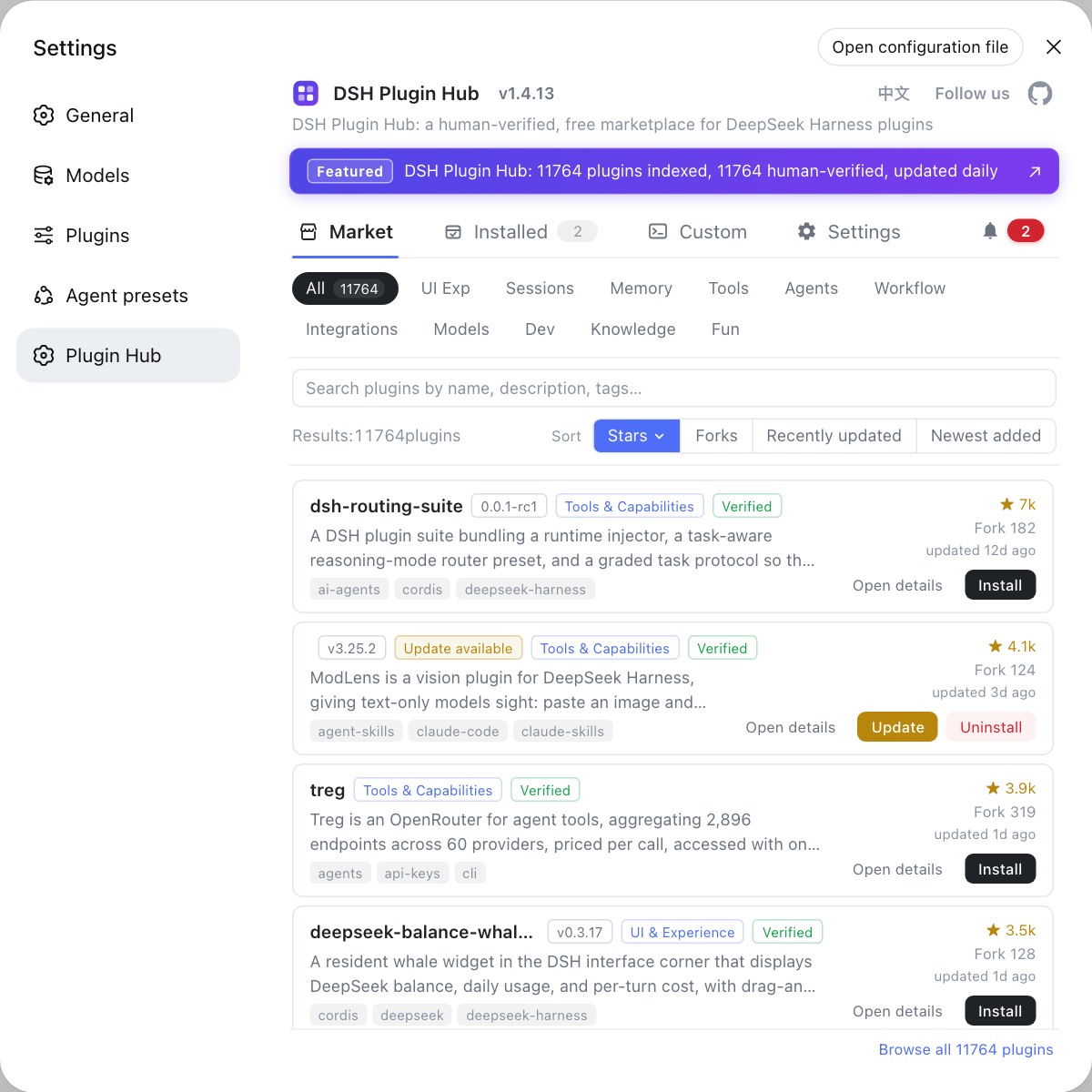
Managing environment changes in one place saves far more trouble than retrospectively reconstructing them from logs.
Source: Discussion #7834.
FAQ
Do not go toward the network yet. There is only one way to tell: check whether this failure sent an HTTP request. The measured signature of this issue is **an HTTP request count of 0** and each attempt failing in 6–20ms (a purely local error, no network round trip), yet it still backs off with 5 retries. Seeing the combination "TRANSPORT + zero requests" lets you rule out network, proxy, certificates, and auth outright.
Because prepareImages re-reads all images referenced by the session on **every request**. As long as the history still contains an attachmentId pointing at that deleted object, resolution throws ATTACHMENT_NOT_FOUND, so every request in this session fails at the local preparation stage. A new session is unaffected, because it does not reference these attachments.
Basically no. Attachments are stored **content-addressed**: paths look like $DSH_HOME/attachments/v1/objects/<first two sha256 chars>/<sha256>, with the filename being the content hash. Once deleted with no backup, there is no way to reverse the path or the session history into the original bytes to rebuild it — which is why this issue is far more serious than "a hard-to-understand error": it amounts to making the session **permanently unable to send messages**.
Because the catch-all wraps it as TRANSPORT, and TRANSPORT is in the default retry set, so every failing step backs off and retries 5 times (the 0.5s→8s llm/retry chain). The real code ATTACHMENT_NOT_FOUND is itself **not** in the default retryable set — meaning that as soon as the failure reports under the attachment's own identity, the retries stop. Retrying a "local file does not exist" error 5 times is pure latency.
As of the report cited here, both spots remain in the latest version (including the desktop's bundled runtime): the throwing point is attachment-local/src/store.ts:443, and the misreport point is llm-deepseek/src/adapter.ts:66. The reporter provides two locally verified patches: (1) (small) keep the failure as ATTACHMENT_NOT_FOUND and name the attachment — the error is accurate but the session still fails; (2) (behavior change) downgrade attachments whose stored bytes cannot be read into placeholder text so the request goes out — this is the step that genuinely solves the "session bricked" problem. Note: do not switch the core to npm's latest (still stuck at the older 0.1.5-rc.3), use npm i -g @deepseek-ai/dsh@next.
Related Terms
- content-addressed storage
- Attachment objects are not saved by name but by content hash: `$DSH_HOME/attachments/v1/objects/<first two sha256 chars>/<sha256>`. Session history keeps only an `attachmentId` reference. The benefit is natural deduplication and immutability; the cost is that once an object is deleted with no backup, the reference cannot be reversed into the original bytes, so a session referencing it can never read that image again.— https://github.com/deepseek-ai/deepseek-harness/discussions/7834
- ATTACHMENT_NOT_FOUND vs TRANSPORT
- `ATTACHMENT_NOT_FOUND` is the attachment layer's (`attachment-local`) own error code thrown when the underlying filesystem reports `ENOENT`; its meaning is precise and it is **not** in the default retryable set. `TRANSPORT` is the LLM adapter's catch-all code: when the request-preparation stage throws anything that is not an `LlmError`, it wraps it as `TRANSPORT` unconditionally. So a "local attachment missing" gets labeled "transport failed", sending troubleshooting toward the network.— https://github.com/deepseek-ai/deepseek-harness/discussions/7834
- prepareImages
- The function in `llm-deepseek/src/images.ts` that resolves image references in the request history into a sendable form; it re-reads all images referenced by the session on every request and dedupes/caches them by `attachmentId`. Because it re-reads per request, one missing object makes **every** request in that session fail, not just fail once.— https://github.com/deepseek-ai/deepseek-harness/discussions/7834
- offloaded image projection
- An existing mechanism in the repo: when an image exceeds the request's image quota, replace it with a line of deterministic placeholder text (`offloadedImageText`) and then project it (`projectOffloadedImages`), rather than failing the request. This mechanism was later reused to handle "attachment cannot be read": adding `unavailableImageText` and `projectUnavailableImages`, where the projection takes effect only **within the request** and the original reference in the persistent log stays unchanged.— https://github.com/deepseek-ai/deepseek-harness/discussions/7834