Add the plugin market by CLI: dshmarket for DeepSeek Harness
To add the plugin market to DeepSeek Harness from the command line, just run dsh plugin --profile web add dshmarket — it installs dshmarket, a visual market, as a DSH plugin into the web profile, and after a restart the settings show the market entry (source). This guide takes the command apart segment by segment, then explains how to troubleshoot when it does not take effect.
DSH plugin overview: first the market plugin, then installing plugins in the market
The order matters: the market is itself a plugin, so you must first install it into a profile from the command line before any UI exists to install other plugins. So this command solves the "connect the market from scratch" step:
| Stage | What to do | What to use |
|---|---|---|
| Step one | Install the market plugin into a profile | dsh plugin --profile web add dshmarket |
| Step two | Restart the service so the plugin loads | Close and start dsh web again |
| Step three | Install other plugins in the UI | Settings → Plugin Market, one-click install |
In one line: dshmarket is the "install the market" command, not the "use the market to install plugins" command.
What the DSH plugin dshmarket is: installing the plugin market into a profile
dshmarket is a community DSH plugin whose job is to bring a visual plugin market into the DeepSeek Harness interface. Officially, dsh plugin is positioned as "managing a profile's plugins", and dshmarket is exactly a market app that follows this mechanism and is distributed in plugin form (source).
The changes it brings are direct:
- A new UI entry — after installing and restarting, a plugin market appears in the settings, browsable and searchable in the app (source).
- One-click install — click install in the market; no need to remember each plugin's package name and command.
- Visual management — installed plugins and update availability are shown together in the UI.
So remember: the market plugin solves the "entry for discovery and install"; the actual install of plugins is still governed by dsh plugin.
Breaking down the DSH plugin command, segment by segment: dsh plugin --profile web add dshmarket
The syntax is dsh plugin --profile <profile name> <arguments passed to the package manager>, and add dshmarket is the forwarded argument. Officially, dsh plugin --profile <name> <pnpm args> forwards the arguments to the package manager in that profile's directory (source). Segment by segment:
| Segment | Meaning |
|---|---|
dsh plugin | The plugin management subcommand |
--profile web | Install into the web profile (the environment the web UI uses) |
add | The action to perform: add a package |
dshmarket | The package name to add, i.e. that market DSH plugin |
Four steps:
-
Check the prerequisites — get DeepSeek Harness running with the web profile initialized. Expected:
dsh webstarts normally. -
Run the install command — in a terminal, run:
bashdsh plugin --profile web add dshmarketExpected: download and install progress appears in the terminal, ending without errors.
-
Restart the service — close the current
dsh weband start it again so the new plugin loads. Expected: startup reports no plugin resolution errors. -
Open the market entry — go to Settings → Plugin Market. Expected: the browse, search and install UI is visible.
To confirm it is installed, run dsh plugin --profile web list and check that it is in the list (source).
How to troubleshoot a DSH plugin that does not take effect
If you cannot see the market after installing, check four things in order: profile → restart → entry → compatibility. Troubleshooting steps:
- Verify the profile — confirm the command carried
--profile weband matches the environment you are actually using. Expected: the profile installed into and the one the UI uses are the same; installing into the wrong profile is the number-one cause of "installed but invisible". - Confirm the restart — plugins load at startup, so the UI does not refresh until you restart. Expected: the entry appears after restarting
dsh web. - Find the right entry location — the market entry is on the settings page, not the session window. Expected: Settings → Plugin Market shows it.
- Check compatibility and logs — confirm the market plugin's stated compatible version matches your core version and check the install log for errors. Expected: versions match and there are no errors.
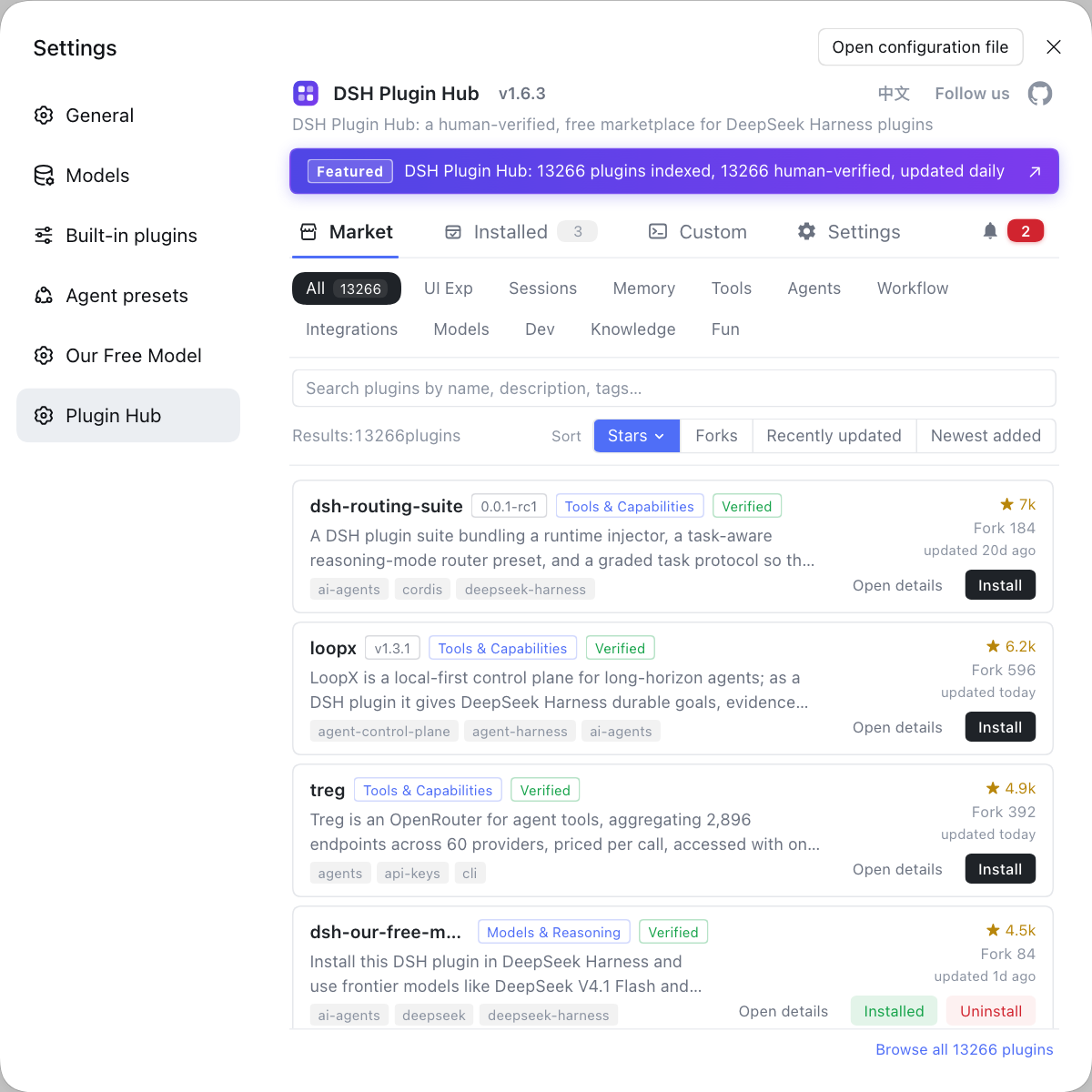
One point worth stating clearly: dshmarket and DSH Plugin Hub are not the same thing — they are two different market plugins. Both install via dsh plugin --profile web add <package> and each adds a market UI to the settings. Which to pick is up to which catalog and experience you prefer; either way you can manage plugins in one place in the UI afterwards.
Rather than hunting for packages across repositories by hand and typing commands one by one, install a visual market: it is DeepSeek Harness's plugin market entry, with browsing, one-click install, uninstall, update detection and system logs all in one place, a confirmation dialog before each install, and one installed list to manage everything afterwards.
DSH plugin caveats
These are the DSH plugin pitfalls that trip people up most when wiring a market plugin into a profile. One by one:
- Do not reverse the command order:
dsh plugin --profile web add dshmarket—--profilecomes beforeadd, and the package name comes last. - You are installing the market, not a plugin: first use it to bring the market in, then use the market to install other plugins.
- Restart after installing: plugins load at startup, so the entry is invisible without a restart.
- Keep the profile consistent: only installing into the web profile affects the UI, which matters especially in multi-profile setups.
- Do not mix up the two markets: dshmarket and DSH Plugin Hub are two independent plugins; which to install is your call, and installing both kinds is unnecessary and not recommended.
Sources: dsh CLI README, dshmarket (npm), dsh-market/dsh-market, dshplugin/dsh-plugin-hub
FAQ
It installs dshmarket, a visual plugin market, as a DSH plugin into the web profile. After installing, restart dsh web and a plugin market entry appears in the settings, where you can browse, search and one-click install community plugins without typing install commands by hand.
The three segments are: dsh plugin is the plugin-management subcommand, --profile web specifies which profile to install into, and add is the action to perform. Officially, dsh plugin --profile <name> <args> forwards the arguments to the package manager in that profile's directory, so add dshmarket means adding this package in that profile.
The former installs the market itself; the latter uses the market to install other plugins — you need the former before the latter. dshmarket is itself a plugin, so you must first install it into a profile from the command line, and only after a restart does the market UI exist; with the UI in place, installing other plugins is one click in the market.
Check three places: the profile, the restart and the entry point — first confirm the command used --profile web and installed into the profile you are actually using, then restart dsh web so plugins reload. If it is still missing, look for the plugin market entry in the settings and confirm the market plugin is compatible with your core version and that the install reported no errors.
They are not the same: dshmarket and DSH Plugin Hub are two different market-type DSH plugins, both used to browse and install plugins. Both install via dsh plugin --profile web add <package>, and each adds its own UI entry to the settings. Which to pick depends on which catalog and preferences you favor; either way you can manage plugins in the UI afterwards.
Related Terms
- dshmarket
- dshmarket is a community DSH plugin that brings a visual plugin market into DeepSeek Harness, providing an in-app interface to browse, search and one-click install community plugins. It is installed into a profile via dsh plugin --profile web add dshmarket.— dshmarket (npm package page)
- dsh plugin (plugin management subcommand)
- dsh plugin is the subcommand that manages a profile's plugins in DeepSeek Harness, used as dsh plugin --profile <name> <args>, which forwards the arguments to the package manager in that profile's directory.— dsh CLI README
- --profile
- --profile specifies the profile name to operate on; a plugin installed into a profile only affects that environment. The web UI uses the web profile, written as dsh plugin --profile web add <package>.— dsh CLI README
- DSH Plugin Hub
- DSH Plugin Hub is another community plugin-market DSH plugin, built into Settings → Plugin Market, where you can browse, install, uninstall and update plugins in the app. It is a different market plugin from dshmarket.— dshplugin/dsh-plugin-hub
Sources
- dsh CLI README (plugin add and --profile semantics)· deepseek-ai
- dshmarket (npm package page)· npm
- dsh-market/dsh-market· dsh-market
- dshplugin/dsh-plugin-hub· dshplugin