DSH plugin 怎么安装?dsh plugin add 命令与 GitHub 仓库安装验证
DSH plugin 的安装命令就一条:dsh plugin --profile web add <插件包名或 GitHub 地址>,框架会把参数转发给 pnpm,自动把插件装进当前 profile。
安装前:先有 DSH
装 DSH plugin 的前提是先跑通 DSH 本体。 没装的话先看《DeepSeek Harness 怎么安装》,用 npx @deepseek-ai/dsh web 把 Web UI 跑起来。第一次启动时,web profile 会自动初始化,之后 dsh plugin 命令才有地方可装。
注意:dsh web 是 --profile web 的别名,所以装插件时 profile 写 web,就是装进 Web UI 正在用的那个 profile(来源)。DSH 内置 web 和 headless 两个 profile,都在首次使用时从自带模板自动初始化;其他名字的 profile 不存在时,需要先用 dsh plugin 创建。调用 dsh 的目录是默认工作区根目录,装完插件后的会话和工作区都围绕这个目录展开。
核心命令:dsh plugin add
装插件统一走 dsh plugin --profile <name> <pnpm 参数>,add 表示安装。 完整写法:
dsh plugin --profile web add <插件包名或GitHub地址>
- 插件是 npm 包时,直接写包名;
- 插件托管在 GitHub 时,写
github:用户名/仓库名这样的引用(来源)。
dsh plugin 是 profile 插件管理的统一入口,add 只是其中一个动作,install / update / remove 都是同一条语法换参数。命令会把 --profile <名字> 之后的参数原样转发给 profile 目录里的 pnpm,相当于在 ~/.dsh/profiles/web 下执行 pnpm add(来源),所以动作词要写在命令最后。
命令执行后,插件会作为依赖装进 profile 目录(默认 ~/.dsh/profiles/web),DSH 下次启动时自动加载并注册它的能力。装进哪个 profile,插件就只影响哪个环境,web 和 headless 互不干扰。
真实 DSH plugin 示例
拿 DSH Plugin Hub——我们自己的插件市场——练手。 它是界面类插件,装完会在 DSH 里多出「插件市场」,以后装插件、卸载、更新都能在界面里一键完成。它同时支持 GitHub 和 npm 两种来源,正好把前面的两种写法都覆盖到:
GitHub 仓库安装:
dsh plugin --profile web add github:dshplugin/dsh-plugin-hub
npm 包安装:
dsh plugin --profile web add dsh-plugin
装完重启 dsh web,侧边栏就会多出插件市场,这就是安装后的效果:
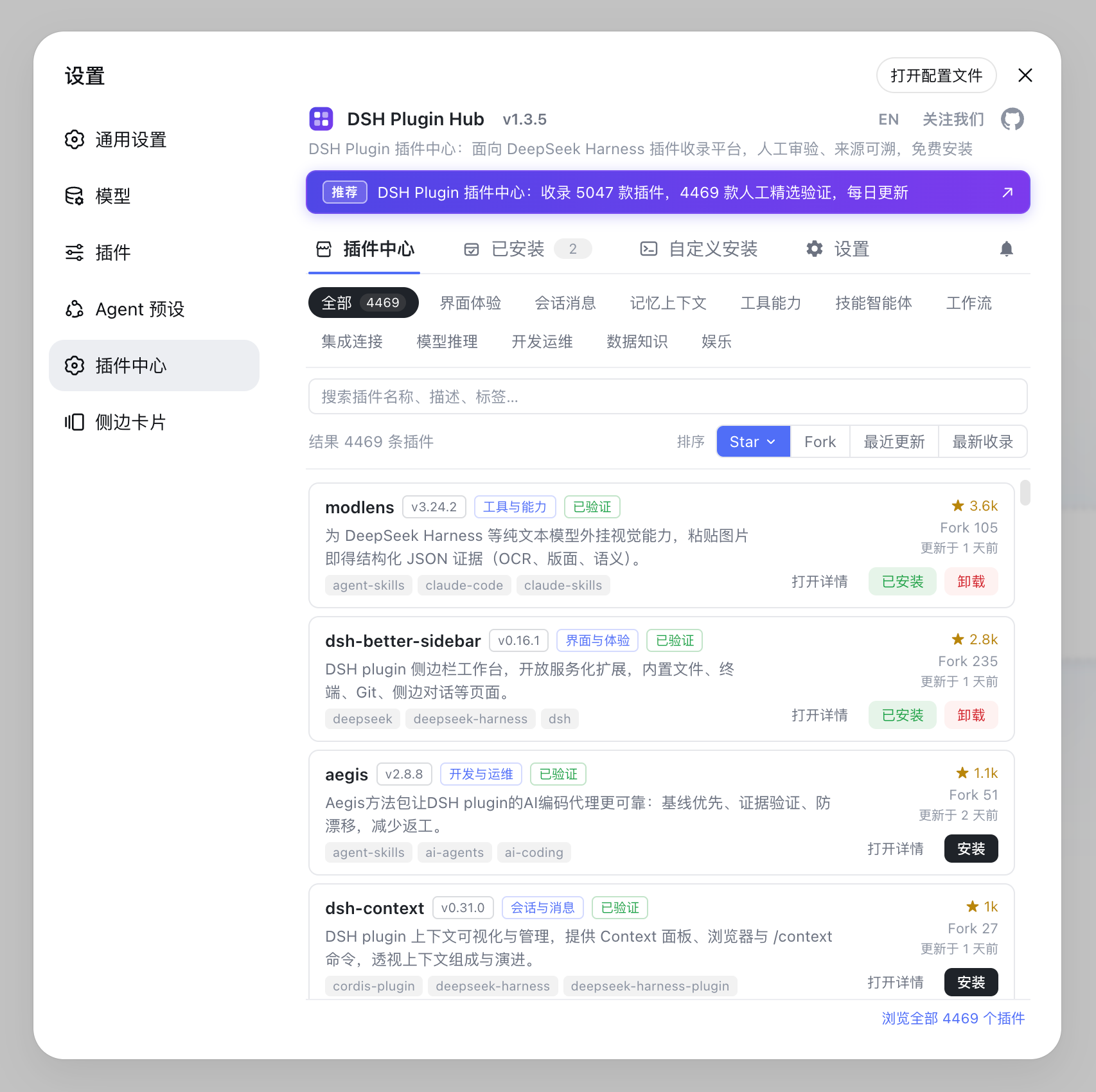
之后想要更多插件,直接在插件市场里搜索一键安装就行,不用再记命令。其他插件也都一样:npm 包直接写包名,GitHub 托管的写 github:用户名/仓库名,到 dsh-plugin.org 插件市场 里每个插件的详情页都带一行可直接复制的安装命令。
DSH plugin 装完怎么验证
重启 dsh web,看插件能力是否出现。 界面类插件会改 UI,工具类插件会出现在工具的列表里。装完没生效,先核对插件标注的兼容版本,再看下面的注意事项。想确认插件到底有没有加载,执行 dsh --dump-config 看组合后的配置树,插件注册没注册一眼能看出来;想知道某个插件为什么被装、被谁依赖,用 dsh plugin --profile web why <包名> 查依赖关系(来源)。
首次安装 git 插件的注意点
git 托管的插件首次 add 可能被 pnpm 的 allowBuilds 拦住。 pnpm 默认不放行 git 依赖的构建脚本,报错时按提示把允许 key 复制到 profile 目录的 pnpm-workspace.yaml,重新执行一次 add 即可。
另外,DSH 还在开发者预览阶段(当前版本 0.1.0-rc.6),安装命令和插件接口都可能变化,遇到问题以官方文档为准,也可以回来翻《DSH 常见问题排查》。
常见问题
执行 dsh plugin --profile web add <插件包名或GitHub地址>,框架会把参数转发给 pnpm 自动安装,重启 dsh web 后插件生效。
需要。先用 npx @deepseek-ai/dsh web 启动一次 DSH,web profile 会自动初始化,之后 dsh plugin 命令才有地方安装插件。
pnpm 默认不放行 git 依赖的构建脚本,按报错提示把允许 key 复制到 profile 目录的 pnpm-workspace.yaml,重新执行 add 即可。
打开插件详情页,复制 install.command 那一行命令,回终端执行即可,比如 dsh plugin --profile web add github:liustack/modlens。
重启 dsh web,界面类插件会改变 UI,工具类插件出现在工具列表;装完没生效就核对插件兼容的 DSH 版本。
来源
- dsh CLI README· deepseek-ai
- DeepSeek Harness 官方文档 - Quickstart· deepseek-harness