DSH plugin install fails: add hangs and junction delete
In DeepSeek Harness (DSH)'s plugin install/uninstall flow, three kinds of incidents hurt the most time: dsh plugin add on Windows prints Done in … and then hangs without exiting, reporting "install failed" even though the plugin is actually installed; installing with a bare package name gets silently downgraded to the previous version by pnpm's release-age gate, then rejected as incompatible and rolled back; and uninstalling a link:-installed plugin has the delete logic follow the junction recursively into the source repo, hollowing out .git along with it. The first two are essentially "the host's bundled pnpm and the CLI path lack a fallback"; the third is a dangerous real deletion path — this batch of threads contains both the full incident and actionable recovery methods (#9261, #9342, #9178, #9835, #8898).
DSH plugin install hang: the process does not exit after printing
The one-line conclusion: what is stuck is not "the install did not finish" but "the wrap-up did not finish" — the host's bundled pnpm does not exit after printing, and this CLI path passes no idle timeout and inherits stdio, so the fallback cannot reach it either, and the plugin is "installed but not loaded". The symptom is that on Windows, dsh plugin --profile X add Pkg prints Done in … using pnpm v11.x and then hangs for 11 minutes or more, and bundles never reconcile (#9261). Conversely, "installed but not loaded" can also be an activation-stage problem rather than an unfinished wrap-up — to tell which side you are on, cross-check DeepSeek Harness plugin load: already registered, pending.
DSH plugin mechanism: two gaps compounded
According to community source review and reproduction across environments (reproduced on both Windows and macOS) (#9261):
- A pnpm defect of its own: the host's bundled pnpm (11.7.0 in the thread) has a "process does not exit after the task completes" problem, fixed upstream starting in 11.23.0 (upstream issue
pnpm#13226); - The CLI path has no fallback: the call site passes no idle timeout and sets stdio to inherit, so "give up after a while" is structurally unreachable.
DSH plugin five steps to handle it
- Confirm the plugin is actually installed: check whether the profile's
node_modulescontains that package directory, and whether the profile'spackage.jsonalready lists the dependency; if so, the install stage is done (#9261). - Kill the stuck process chain: do not wait for it to exit on its own —
# Find the stuck pnpm / node process chain and end it (keep the host process itself)
Get-Process node,pnpm -ErrorAction SilentlyContinue |
  Where-Object { $_.StartTime -gt (Get-Date).AddMinutes(-30) } |
  Select-Object Id, ProcessName, StartTime
# After confirming the target: Stop-Process -Id <Id> -Force
- Trigger a reconcile once manually: restarting DSH realigns the profile with the on-disk state, and only after this step does the plugin actually load (#9261).
- Fix the root cause: upgrade the host's bundled pnpm to ≥ 11.23.0, or install directly with a newer pnpm from the system (#9261).
- A side issue: the thread also mentions an occasional
os error 5on Windows that prevents writing the manifest, requiring a manualpackage.jsonedit and a rerun of the install (#9261).
DSH plugin bare-name install pulled an old version: release-age gate + two rulers
The one-line conclusion: pnpm 11 by default only accepts versions released at least 24 hours ago, while DSH's compatibility precheck uses pnpm view (not affected by the gate) and the actual install uses pnpm add (affected by the gate) — the two rulers disagree, so you get "precheck passes, old version installed, then judged incompatible". The error also sends you toward allow-version, which is the wrong direction (#9178).
DSH plugin four steps to handle it
- Confirm the criterion: the same plugin installed with a bare name is reported "incompatible", while specifying the latest version number explicitly installs fine — that is this case (#9178).
- Workaround one (simplest): include the version explicitly at install time:
dsh plugin --profile <profile> add <package>@<version>
- Workaround two: wait until that version has been released for a full 24 hours before installing with the bare name (#9178).
- Watch the side effect: if you use
minimumReleaseAgeExcludeto exclude some packages, note that older pnpm takes only the first of multiple exclusion entries for the same package and silently ignores the rest (newer versions merge them) (#9178).
DSH plugin related: the whole profile locked out (lockfile-level check)
There is a harsher form: the gate check applies to the entire lockfile, so as long as any entry in it is newer than the threshold, every install and update for that profile hard-fails, and the error often names a package you are not installing (#9342).
- Confirm: the error is
ERR_PNPM_MINIMUM_RELEASE_AGE_VIOLATION, and the package it names differs from the one you are installing (#9342). - Workaround one: temporarily set the minimum release age to 0:
dsh plugin --profile <profile> add <package> --config.minimum-release-age=0
- Workaround two: merge into one the
minimumReleaseAgeExcludeentries written repeatedly for the same package inpnpm-workspace.yaml(older pnpm only honors the first) (#9342). - Know the version boundary: this merge defect on the pnpm side was fixed in 11.9.0, while the host bundles an earlier version, so "switch to a newer pnpm" also fixes it as a side effect (#9342).
DSH plugin uninstall incident: the junction of a link: plugin is deleted recursively
The one-line conclusion: the uninstall path treats the junction as an ordinary directory and deletes it recursively, so it walks into the link target and deletes the plugin source repo together with .git — this is the only form in this family that causes data loss. The reporter provided a full forensics of the scene: the deletion advanced in alphabetical order of directory entries and stopped before objects (#9835).
DSH plugin assess the damage first
- Do not touch the disk yet (especially do not run write operations like
git init/git cleanin the repo), and leave the scene for recovery. - Check whether
.git/objectsis still there: this is the key to whether you can recover fully. If theobjectsdirectory remains, the vast majority of objects can be recovered (#9835). - Confirm what was deleted: list the repo root and see what is left besides
.git(for example, whether.deepseek-harness/is also gone).
DSH plugin four steps to recover (when .git/objects is intact)
cd <your repo>
# 1) Rebuild a minimal HEAD and config
"ref: refs/heads/main" | Out-File -Encoding ascii .git/HEAD
git config core.repositoryformatversion 0
git config core.bare false

# 2) Recover dangling objects
git fsck --lost-found
#    Expected: a batch of dangling commit / blob output

# 3) Reattach the most recent commit to the branch
git reset --hard <the latest commit id from the output above>
#    Expected: the working-tree files come back

# 4) Verify integrity
git status
git log -n 5 --oneline
Per the recovery method given in the thread: when .git/objects is intact, rebuilding HEAD/config plus git fsck --lost-found is enough to pull the content back (#9835).
DSH plugin one layer of attribution to state honestly
The thread disagrees on which layer the deletion happens in: the reporter believes it is in the uninstall path, while the community, after review, leans toward the deletion happening inside the pnpm child process and questions the implementation details of the lstat check. This is not settled in the thread, so this article writes out only the confirmed fact that "the junction is followed and deleted" plus the recovery steps, and draws no conclusion on layer attribution (#9835).
DSH plugin prevention
- Before uninstalling, confirm whether the target is a reparse point:
Get-ChildItem -Force -Recurse -Attributes ReparsePoint "<profile>\node_modules" |
  Select-Object FullName, LinkType, Target
#   Expected: lists all junctions / symlinks and their targets
- Delete only the link, not the target: when cleaning up by hand, delete the link itself; the
.gitdirectory must never fall inside the deletion scope (#9835). - Prefer real-directory installs during development: copying the plugin into a real directory before installing avoids the whole class of junction-related problems (#9835).
- Back up important repos in advance: it is normal for source repos to be linked in on a dev machine, and the only reliable insurance is a backup (#9835).
DSH plugin one more: a tarball URL with query parameters will not install
The one-line conclusion: the rule that detects a tarball URL requires the extension to appear at the end, but a URL with ?token= ends in a query string; another rule then treats that two-segment path as a git repo URL, so it is either rejected before install or misparsed as a git source. (#8898)
- Confirm: the error is
InvalidInstallSpecError, or a tarball direct link you clearly gave is parsed as a git repo (#8898). - Workaround one: download the file to a local tarball first (keeping the query parameters so authentication completes), then install from the local file path.
- Workaround two: if the direct link needs no authentication, strip the query parameters and retry.
- Upstream direction: the fix proposed in the thread is to detect the extension in the path portion of the URL and pass the query string through to pnpm as-is (the reporter's patch passed 120 tests plus Web e2e) (#8898).
DSH plugin troubleshooting notes
The first principle for install/uninstall incidents is: first separate "did it install" from "did it load" — in DSH these are two distinct steps. Nine points:
- When it hangs, check
node_modulesand the profilepackage.jsonfirst to confirm whether the install stage actually finished (#9261). - The process not exiting ≠ install failure: distinguish "installed but not wrapped up" from "failed halfway through the install" (#9261).
- Let reconcile run once: restarting the host is the easiest and most effective step (#9261).
- For "incompatible", suspect an old version was installed first: check the actually installed version number instead of following the error to change
allow-version(#9178). - One ruler, two standards: the precheck and the install go through different commands, and that mismatch is the root cause here (#9178).
- The lockfile-level check locks the whole profile: the package named in the error may not be the one you are installing at all (#9342).
- Always glance at reparse points before uninstalling: this command takes two seconds and can prevent a repo-level incident (#9835).
- Recover early and do not write to disk:
.git/objectsis the lifeline of recovery (#9835). - State the fix status honestly: the pnpm non-exit and the release-age merge defect are both fixed in newer upstream versions, but the host bundles an old version, so manual workarounds are still needed for now; the layer attribution of the
junctionrecursive delete is not settled in the thread, and no official fix is confirmed.
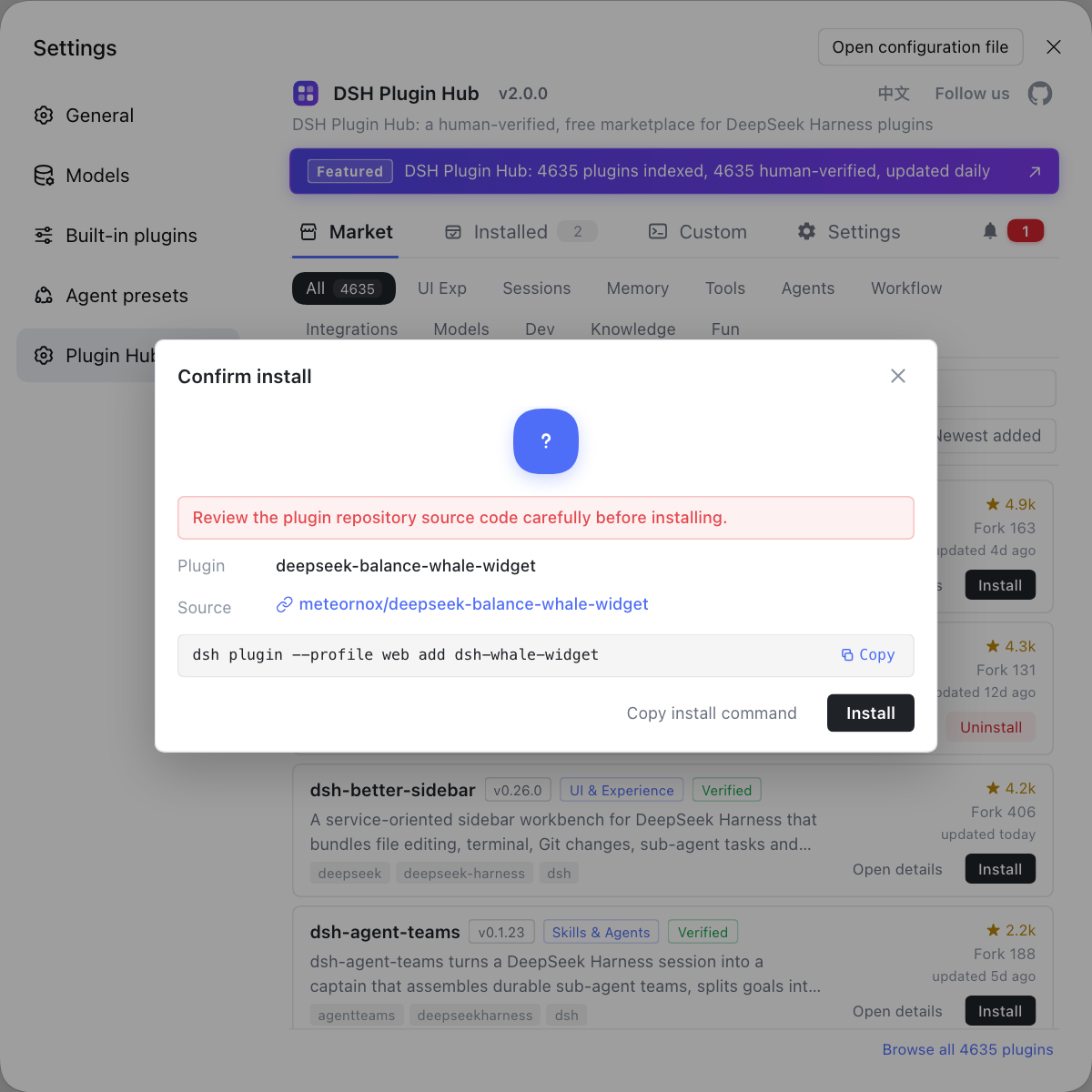
Plugin install/uninstall is the most failure-prone part of this ecosystem, so it deserves a dedicated interface that reduces the variables. Instead of typing commands everywhere and reverse-engineering state from node_modules afterward, use a visual marketplace like DSH Plugin Hub: the install dialog confirms the source and the command to be run, the installed list carries source markers and versions, updates and uninstalls each have a confirmation step, and when something goes wrong you can read the system logs directly.
Source: Discussion #9261, Discussion #9342, Discussion #9178, Discussion #9835, Discussion #8898.
FAQ
In DeepSeek Harness, when dsh plugin add prints Done in and then hangs without exiting, the dependency is in most cases already installed and only the wrap-up is stuck. The host's bundled pnpm has a defect where the process does not exit after printing (fixed upstream in a newer version), and this CLI path passes no idle timeout and inherits stdio, so the timeout fallback cannot reach it either; the plugin is then 'installed but not loaded'. The fix is to upgrade the bundled pnpm, or kill that process chain after the timeout and trigger a profile reconcile manually.
This is a DeepSeek Harness bare-name install tripping over pnpm's release-age gate. pnpm 11 by default only accepts versions released at least 24 hours ago, so the bare name resolves to the previous version, which is often no longer compatible with the current DSH; the compatibility check then rejects the install and rolls back. Avoid it easily by specifying the version explicitly (package name plus @ and the version number), or wait the full 24 hours before installing.
In DeepSeek Harness, that error means the check runs over the whole lockfile, not only the package you are installing. As long as the lockfile holds any entry newer than the threshold, every install and update in that profile is locked out. Avoid it by setting the minimum release age to 0 (as a command-line flag), or by merging multiple exclusion entries for the same package into one (newer versions support merging; on older versions only the first one takes effect).
In most cases yes: when DeepSeek Harness uninstalls a link:-installed plugin by following the junction recursively, the objects under .git usually survive. Recovery is to rebuild HEAD and config in .git, then run git fsck --lost-found to recover objects and reset to a branch. From now on, before uninstalling such a plugin, confirm whether the target is a reparse point and, if needed, delete only the link, not the target.
An HTTP tarball URL with ?token= will not install as a DeepSeek Harness plugin because the plugin manager's tarball detection requires the extension to appear at the end, and a URL with query parameters ends in a query string. Another matching rule then treats that two-segment path as a git repo URL, so it is either rejected before install or parsed as a git source. Avoid it by downloading the file with its query parameters to a local tarball first and installing that, or by stripping the query parameters and using the direct link.
Related Terms
- dsh plugin add
- dsh plugin add is DeepSeek Harness's command-line entry point for installing plugins, taking a profile plus a package name or source. It calls pnpm internally to resolve and install dependencies, so pnpm's version, configuration, and known defects directly affect its behavior.— https://github.com/deepseek-ai/deepseek-harness/discussions/9261
- minimumReleaseAge
- minimumReleaseAge is a pnpm supply-chain safeguard that accepts only versions older than a threshold (24 hours by default), reducing typosquatting and poisoning risk. It applies to the whole lockfile, not just to the package being installed.— https://github.com/deepseek-ai/deepseek-harness/discussions/9342
- profile reconcile
- profile reconcile is the process by which DeepSeek Harness aligns its profile declaration with what is actually installed on disk, pulling new plugins into the runtime after install or uninstall. It does not run when the install process exits abnormally, which shows up as 'installed but not loaded'.— https://github.com/deepseek-ai/deepseek-harness/discussions/9261
- junction (directory junction)
- A junction is a Windows directory reparse point that makes one directory path point to another local directory, and creating one requires no special privilege. A link: plugin install produces this kind of link under node_modules, and if the uninstall logic deletes it recursively as an ordinary directory, it walks into the link target and deletes the plugin source repo.— https://github.com/deepseek-ai/deepseek-harness/discussions/9835
Sources
- #9261 — dsh plugin add hangs on Windows without exiting; profile bundles never reconcile· deepseek-ai (GitHub Discussions)
- #9342 — dsh plugin add hard-fails because the lockfile contains an entry newer than minimumReleaseAge· deepseek-ai (GitHub Discussions)
- #9178 — Plugin manager bare-name installs are affected by pnpm 11 minimumReleaseAge, silently downgrade one version, and get rejected as incompatible· deepseek-ai (GitHub Discussions)
- #9835 — Windows: uninstalling a link:-installed plugin follows a junction recursively and hollows out the plugin source repo· deepseek-ai (GitHub Discussions)
- #8898 — Plugin Manager rejects or misclassifies HTTP tarball URLs with query parameters· deepseek-ai (GitHub Discussions)